

The best IoT development board with sensors depends on your project goals, but the Arduino Nano 33 BLE Sense stands out as the ultimate all-in-one choice. It features a powerful 32-bit ARM processor and a rich suite of onboard sensors for color, gesture, motion, and environment. For budget-conscious creators, the M5Stack Core2 offers incredible wireless features, a built-in screen, and integrated sensors at a great price.
Imagine you want to build a smart home device. You buy a chip, some wires, and five different sensors. Soon, your desk looks like a bowl of colorful spaghetti. One loose wire ruins hours of hard work, leaving you to guess what went wrong. This is a very common frustration for electronics hobbyists and experts alike.
This is why many creators now look for boards with built-in sensors. These handy boards keep your projects neat, small, and fast to build. They let you focus on coding and design instead of untangling wires.
But with so many options out there, finding the right one can feel hard. You might find yourself asking: What Is the Best IoT Development Board With Sensors? In this guide, we will look at the top choices on the market. We will explore what makes them special, what sensors they hold, and how to pick the perfect one for your next big idea.
Key Takeaways
- Arduino Nano 33 BLE Sense is the top pick: It offers the most complete set of built-in sensors for motion, light, sound, and environment.
- Built-in sensors save space: Onboard sensors eliminate messy jumper wires and reduce the risk of loose connections in your projects.
- ESP32 boards offer great value: Boards like the M5Stack Core2 provide cheap Wi-Fi, Bluetooth, and built-in sensors in a protective case.
- BBC micro:bit V2 is best for beginners: It features a friendly design, simple sensors, and a great block-based coding environment for learning.
- Consider power needs: Look for boards with deep sleep modes if you plan to run your IoT project on battery power.
📑 Table of Contents
The Magic of All-in-One IoT Boards
Why Built-In Sensors Matter
Connecting parts with jumper wires is fun at first. But wires break, shake loose, and take up too much space. A board with onboard sensors solves these problems. It is a tiny computer that already has its “eyes” and “ears” attached. You can read about how these devices fit into the larger tech landscape in this guide to the world of IoT boards. Having everything on one piece of silicon makes your project highly stable and ready for the real world.
Saving Time and Space
Think about wearable devices. If you want to make a smart ring or a fitness band, you cannot use loose wires. You need a compact design. An all-in-one board fits into small, 3D-printed cases easily. Plus, you save hours of soldering. You can start coding right out of the box, which makes prototyping incredibly fast.
The Top Contenders for the Best IoT Board
Let us look at the absolute best boards that come with built-in sensors today. Each of these boards has unique strengths depending on your skill level and goals.
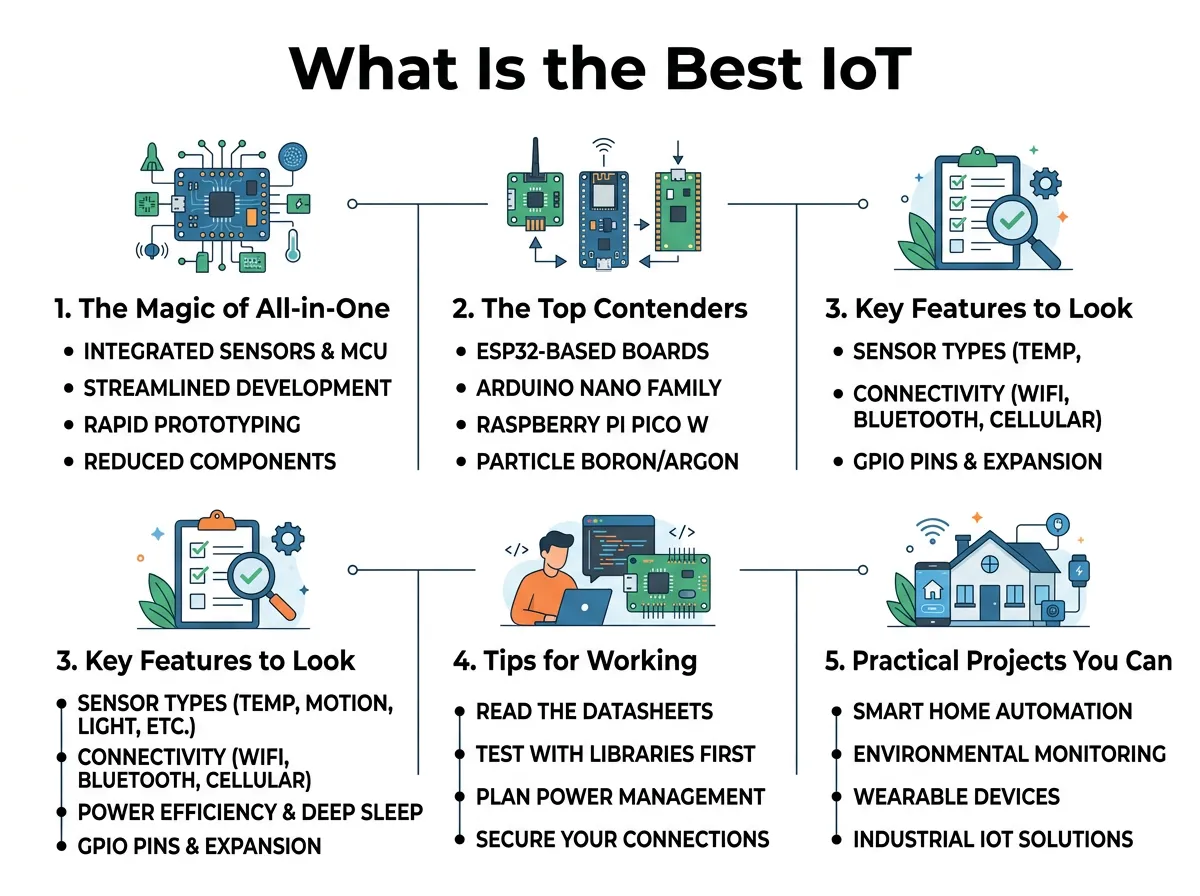
What Is the Best IoT Development Board With Sensors? — key points at a glance
Arduino Nano 33 BLE Sense
This board is a tiny giant. It is about the size of a postage stamp, but it is packed with sensors. It has a 9-axis inertial measurement unit (IMU) to track motion and tilt. It also has sensors for temperature, humidity, barometric pressure, light, and color. It even has a gesture sensor and a digital microphone. When trying to figure out What Is the Best IoT Development Board With Sensors? for machine learning, this is almost always the answer. It works perfectly with TinyML to run AI models directly on the chip.
M5Stack Core2
If you want something with a screen and a case, the M5Stack Core2 is amazing. It is a modular, ESP32-based board. It comes with a touch screen, a built-in speaker, a microphone, and an IMU. Because it is based on the ESP32 chip, you get strong Wi-Fi and Bluetooth. It is perfect for visual projects where you need to see data right away without using your phone. It is also highly expandable with modular “hats” and units.
BBC micro:bit V2
This board is highly popular in schools, but it is also great for fast prototyping. It has a built-in compass, accelerometer, microphone, speaker, and touch sensor. It also has a simple 5×5 LED matrix screen. While it has less processing power than the Arduino, it is very easy to program with block code or Python. It is a great starting point for kids and beginners.
Key Features to Look For
To understand What Is the Best IoT Development Board With Sensors? for your workspace, you must know what features matter most. If you need help choosing, check out these tips on selecting the right IoT development board.
Wireless Connectivity
An IoT board needs to talk to the internet or other devices. Look for boards with built-in Wi-Fi or Bluetooth. ESP32 boards are famous for cheap and fast Wi-Fi. Arduino boards often use Bluetooth Low Energy (BLE), which uses very little battery power and is great for talking to smartphones.
Power Consumption
Will your device plug into the wall, or will it run on a battery? If you want to put a sensor in your garden, you need low power consumption. Look for boards with a “deep sleep” mode. This mode turns off most of the board when it is not sending data, making your battery last for months instead of hours.
Tips for Working with Onboard Sensors
Using boards with built-in sensors is easy, but you should keep a few things in mind to get the best results.
Watch Out for Self-Heating
Many development boards get warm when they run. If a temperature sensor is mounted right next to a warm processor, it will give you high readings. To fix this, you may need to program an offset into your code to subtract a few degrees, or use low-power sleep modes to keep the board cool.
Protect the Sensors
Some sensors, like light and humidity sensors, need exposure to the outside world. If you design a 3D-printed case, make sure to design small holes. This lets air and light reach the sensors while still keeping the main board safe from dust and damage.
Practical Projects You Can Build Today
Now, let us look at what you can actually create with these boards. Here are two fun projects to try.
The Ultimate Smart Weather Station
Using the Arduino Nano 33 BLE Sense, you can build a weather station in minutes. Since the board has temperature, humidity, and pressure sensors built-in, you do not need extra wiring. Simply write a short program to read these sensors. Then, use the built-in Bluetooth to send the data to your phone. You can learn more about how to set up these systems in this introduction to IoT development boards.
A Gesture-Controlled Lamp
The Arduino Nano 33 BLE Sense also has a gesture sensor. You can place the board inside a desk lamp. With a simple wave of your hand, you can turn the lamp on or off. You can even swipe your hand up or down to change the brightness of the light. This is a great, touch-free project for your bedroom or office.
Making Your Final Decision
So, how do you choose? It all comes down to your personal goals and skills. Answering the question of What Is the Best IoT Development Board With Sensors? depends entirely on your project’s unique needs.
For Beginners and Students
If you are new to coding, the BBC micro:bit V2 is a safe bet. It is friendly, hard to break, and has a large community. You will find thousands of free tutorials online to help you get started.
For Smart Home and AI Creators
If you want to build advanced tools, go with the Arduino Nano 33 BLE Sense. Its rich sensor suite and machine learning power make it the king of compact IoT boards. It gives you the most room to grow as your skills improve.
Conclusion
Finding the right tool is the first step to a successful project. When we ask, What Is the Best IoT Development Board With Sensors? the answer is not just about the most expensive chip. It is about finding the board that matches your vision. Whether you want the simplicity of the BBC micro:bit or the sheer power of the Arduino, these boards help you build faster, cleaner, and better. Grab a board, plug it in, and start building today!
Frequently Asked Questions
What is an IoT development board with sensors?
It is a tiny computer chip that comes with sensors already soldered onto the board. This allows you to measure things like temperature, light, and motion without needing extra wires or external components.
Does the Raspberry Pi have built-in sensors?
Most standard Raspberry Pi boards do not have built-in sensors. However, the Raspberry Pi Pico 2 and standard Pi boards can easily connect to sensor hats, while some educational kits come with them pre-packaged.
Can I run machine learning on these boards?
Yes, boards like the Arduino Nano 33 BLE Sense have powerful processors that support TinyML. This allows you to run light AI models for voice recognition, gesture detection, and motion analysis directly on the board.
Are boards with built-in sensors more expensive?
They can cost slightly more than bare boards, but they save you money in the long run. Buying a bare board and purchasing five individual sensors separately is usually much more expensive than buying an all-in-one board.
How do I power an IoT board outdoors?
You can power your board using a rechargeable lithium battery or a small solar panel. To make the battery last, make sure to write code that puts the board into a low-power deep sleep mode when it is not active.
Which board is best for a beginner?
The BBC micro:bit V2 is the best option for beginners. It features a simple design, friendly block-based coding, and built-in sensors that let you learn without any soldering or complex setups.
