


IoT security is the practice of safeguarding connected devices and the networks they use from cyber threats. By securing smart tech like home cameras, wearables, and routers, you protect your personal data from hackers. This guide explains how IoT security works and how to easily secure your own devices today.
Imagine waking up to a warm house. Your coffee machine starts brewing automatically. Your phone tells you your morning schedule. Life with smart gadgets is easy. It is fun and saves time. But have you ever thought about who else might be listening? What if a stranger could see through your smart camera? What if they could open your smart door lock? This is not just a scene from a movie. It is a real threat in our connected world.
When we bring smart devices into our homes, we open new doors. Sadly, some of these doors are for hackers. Every smart speaker, plug, and light bulb connects to the internet. If they are not safe, your whole network is at risk. This brings us to a vital question: What Is IoT Security, and why should you care? Understanding this concept is the key to protecting your digital life.
In this article, we will explore this topic in detail. We will look at why these devices are weak. We will share easy steps to protect your home. Let us dive in and learn how to keep your smart life safe. You do not need to be a tech wizard to secure your home network.
Key Takeaways
- Broad Attack Surface: Every smart device connected to your home network represents a potential entry point for hackers.
- Default Password Dangers: Keeping default passwords on your smart devices is the most common and easily avoided security risk.
- Network Segmentation: Setting up a guest network specifically for IoT devices is a simple way to protect your main computers and phones.
- Regular Firmware Updates: Outdated software leaves devices vulnerable to known exploits, making regular updates essential.
- Encryption Matters: Securing data in transit ensures that even if hackers intercept your data, they cannot read it.
- Proactive Protection: Simple habits like disabling unused features can vastly improve your overall digital safety.
📑 Table of Contents
The Growing Need for IoT Security
Smart tech is everywhere. It is in our kitchens, our cars, and even our bodies. These gadgets make up the Internet of Things, or IoT. While they make life easy, they also bring new risks. Because of this, practicing good IoT security is more important than ever.
The Rise of Connected Devices
A few years ago, only computers and phones connected to the web. Today, almost anything can connect. We have smart TVs, baby monitors, and even smart toothbrushes. Experts say there are billions of active IoT devices today. This number grows every single day. This means there are billions of tiny computers in our homes. Each one is a potential target for hackers.
Why Hackers Target Smart Tech
You might think, why would a hacker care about my smart toaster? It is not about the toaster itself. It is about what the toaster can access. Once a hacker gets into one weak device, they can reach your home network. From there, they can find your personal computer. They can steal your bank details, passwords, and private photos. Good IoT security is the shield that stops this from happening.
Common Vulnerabilities in IoT Devices
To protect our gadgets, we must know why they are weak. Many smart devices do not have strong safety features. Let us look at the most common issues that affect device safety.
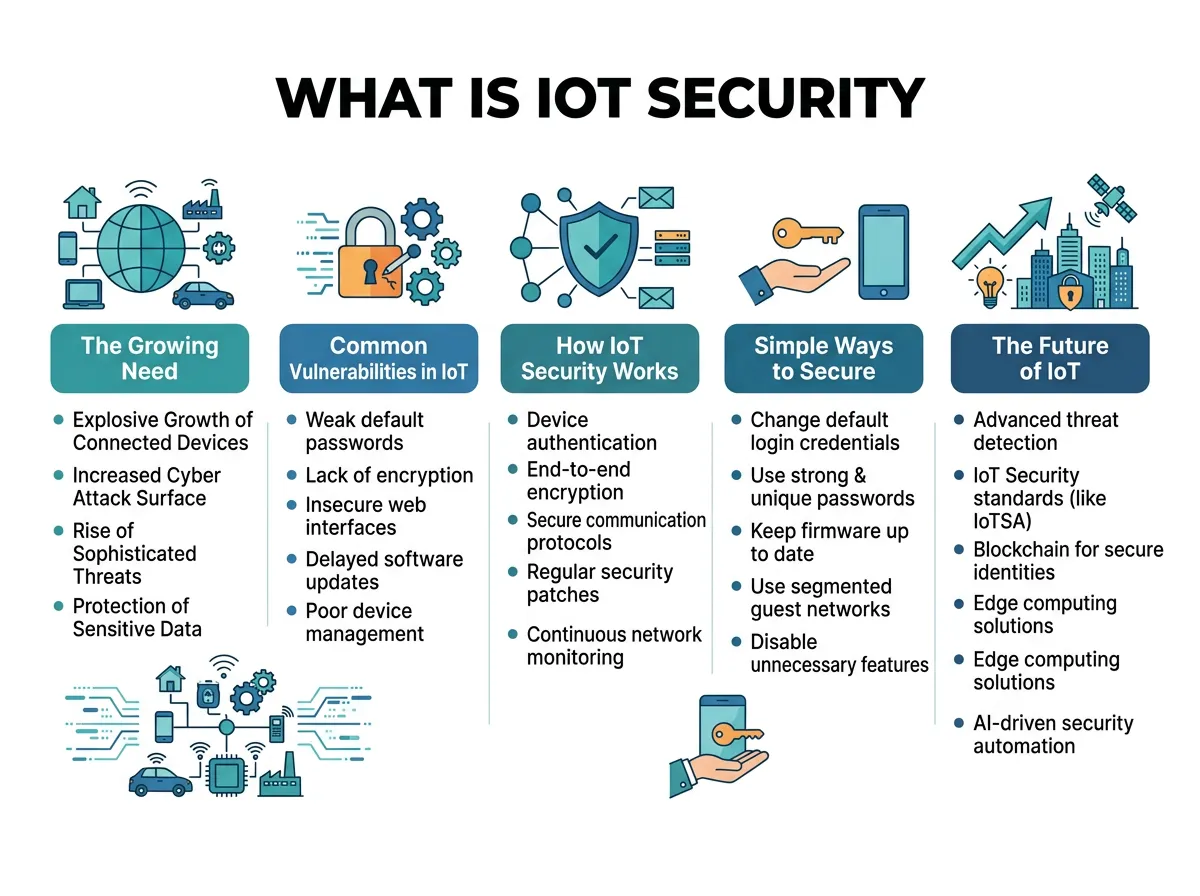
What Is IoT Security? — key points at a glance
Weak and Default Passwords
Many devices come with a default password. Often, it is something simple like admin or 1234. Many people never change these. Hackers know these default passwords. They use automated tools to try them on thousands of devices at once. If you do not change it, you are leaving your front door wide open. This is a major gap in IoT security.
Lack of Regular Software Updates
Your phone gets updates all the time to fix security bugs. But what about your smart light bulb? Many cheap smart devices never get updates. Even if they do, users rarely install them. This leaves security gaps wide open for years. Hackers love these old bugs because they are easy to exploit. Regular updates are a cornerstone of strong IoT security.
Unencrypted Data Transmission
Encryption scrambles your data. It turns it into a secret code. If a device does not use encryption, your data is sent in plain text. Anyone who watches your network can see what you do. They can see your passwords and your habits. Strong IoT security ensures that all your data stays encrypted and private.
How IoT Security Works
Protecting these devices requires a mix of tools and habits. It is not just about one software program. It is about building layers of safety around your connected life.
Device Authentication and Authorization
First, devices must prove who they are. This is called authentication. It ensures only your devices can join your network. Once inside, they should only do what they need to do. A smart light bulb does not need to talk to your laptop. Authorization limits what a device can access on your network, which is a key part of IoT security.
Secure Network Communications
Data must travel safely from your device to the cloud. This requires secure protocols. Think of it like an armored car for your data. Encryption is the key here. It protects your info from being read by outsiders. Without this layer, your smart devices are highly vulnerable.
Monitoring and Threat Detection
Good systems watch for strange behavior. For example, if your smart fridge starts sending millions of emails, something is wrong. Smart security tools can spot this. They can block the device before it causes harm. This proactive watching is essential for complete IoT security.
Simple Ways to Secure Your Smart Home
You do not need to be a tech genius to protect yourself. You can make your home much safer with a few simple steps. Here is how you can boost your IoT security today.
Change Default Login Details Immediately
This is the most important step. When you buy a new device, change the password right away. Do not use easy names or dates. Use a long password with letters, numbers, and symbols. If the device has a default username like admin, change that too if possible.
Create a Dedicated IoT Network
Most modern routers let you set up a guest network. This is a separate Wi-Fi network. Use this guest network only for your smart devices. Keep your computers, phones, and tablets on your main network. This way, if a hacker gets into your smart TV, they cannot reach your personal laptop. This simple network split is a massive win for your IoT security.
Keep Your Router and Devices Updated
Your router is the gatekeeper of your home. Keep its software updated. Check your smart devices for updates once a month. Many apps have an auto-update feature. Turn this on if you can. It keeps you safe without extra work.
Disable Unnecessary Features
Many smart devices have features you do not use. For example, does your TV really need a microphone active all the time? Does your smart camera need to be accessible from outside your home? If you do not need a feature, turn it off. This reduces the ways a hacker can get in.
The Future of IoT Security
As tech grows, security must grow too. The future looks promising, but we must stay alert and adapt to new threats.
Smarter Security Tools
Soon, artificial intelligence will help protect our homes. AI can learn what is normal for your devices. It can block threats in real time. This will make IoT security much easier for everyday users because the system does the hard work for you.
Better Privacy Laws
Governments are starting to take notice of these risks. New laws are forcing companies to build safer devices. In some places, selling devices with default passwords is now illegal. This is a great step forward for everyone. It means safety is built into the product from the start.
Conclusion
We live in an exciting, connected world. Smart devices bring so much joy and ease to our lives. But they also bring responsibility. Understanding the answer to What Is IoT Security is the first step toward a safer home. You do not have to throw away your smart tech. You just need to be smart about how you use it. Change your passwords, update your software, and split your network. These small steps will keep your home safe, allowing you to enjoy your smart devices with total peace of mind.
Frequently Asked Questions
Why is IoT security so important?
IoT security is crucial because connected devices often lack built-in safety features, making them easy targets for hackers. A single breached smart device can give cybercriminals access to your entire home network and personal data. Protecting these devices keeps your private life and financial details safe.
How can I tell if my smart device has been hacked?
You might notice your device operating slower than usual, rebooting randomly, or showing sudden changes in settings. Another common sign is an unexplained spike in your home internet data usage. If your device has a camera or microphone, look out for unexpected activity or indicator lights turning on by themselves.
Do all smart devices need security?
Yes, every single device that connects to the internet needs some level of security. Even seemingly harmless items like smart plugs or light bulbs can serve as entry points for hackers. If it connects to your Wi-Fi, it must be secured to protect your whole network.
What is a guest network and how does it help?
A guest network is a separate Wi-Fi connection created by your main router that isolates connected devices from your primary home network. By placing your IoT devices on this separate network, you protect your computers and smartphones from being accessed if an IoT device gets hacked. It is one of the easiest and most effective ways to boost home security.
Can antivirus software protect my IoT devices?
Traditional antivirus software cannot be installed directly on most smart devices because they lack the necessary operating systems. Instead, you must secure them by protecting your home router and using network-level security tools. Keeping your router firmware updated and using strong network passwords are your best defenses.
Are smart home devices safe to use?
Smart home devices are generally safe to use if you take proper security precautions. By changing default passwords, updating software regularly, and isolating devices on a guest network, you can enjoy their benefits safely. Security is an ongoing practice rather than a one-time setup.
