


IoT device authentication and authorization keep smart networks safe by verifying a device’s identity and controlling its access. First, authentication proves the device is real and can be trusted. Then, authorization decides what data and actions that specific device can access.
Have you ever thought about how many smart gadgets you own? You might have a smart watch on your wrist. You might use a smart TV in your living room. In fact, many of us use smart tools every single day. They connect to our Wi-Fi. They talk to apps on our phones. This makes our lives very easy. We can control our lights with our voice. We can lock our doors from miles away.
But this comfort also opens a new door for hackers. If a smart bulb is not secure, a bad actor can exploit it. They can use it to get into your main home network. From there, they might steal your private data or watch your camera feeds. This is why digital safety is so important today. We must protect our smart gadgets just like we protect our laptops.
How do we stop these digital threats? We must look at how gadgets talk to networks. In this post, we will explore a key topic. How does IoT device authentication and authorization work? We will look at how smart tools prove who they are. We will also learn how they get permission to share data safely. Let us dive in and see how it all works.
Key Takeaways
- Authentication is identity proof: It verifies that an IoT device is exactly what it claims to be before letting it connect.
- Authorization is control: It defines what actions a verified device can perform and what data it can access.
- Multiple methods exist: Security teams use certificates, keys, and tokens to verify and control devices.
- PKI is highly secure: Public Key Infrastructure (PKI) offers strong protection for smart networks.
- A layered approach is best: Combining both steps prevents bad actors from taking over smart systems.
📑 Table of Contents
What Are IoT Authentication and Authorization?
To keep things safe, we need two separate steps. These are authentication and authorization. They sound very similar. In fact, many people mix them up. But they do very different jobs. Think of them as two different guards at a secure gate. One checks your face, while the other checks your ticket.
What Is Authentication?
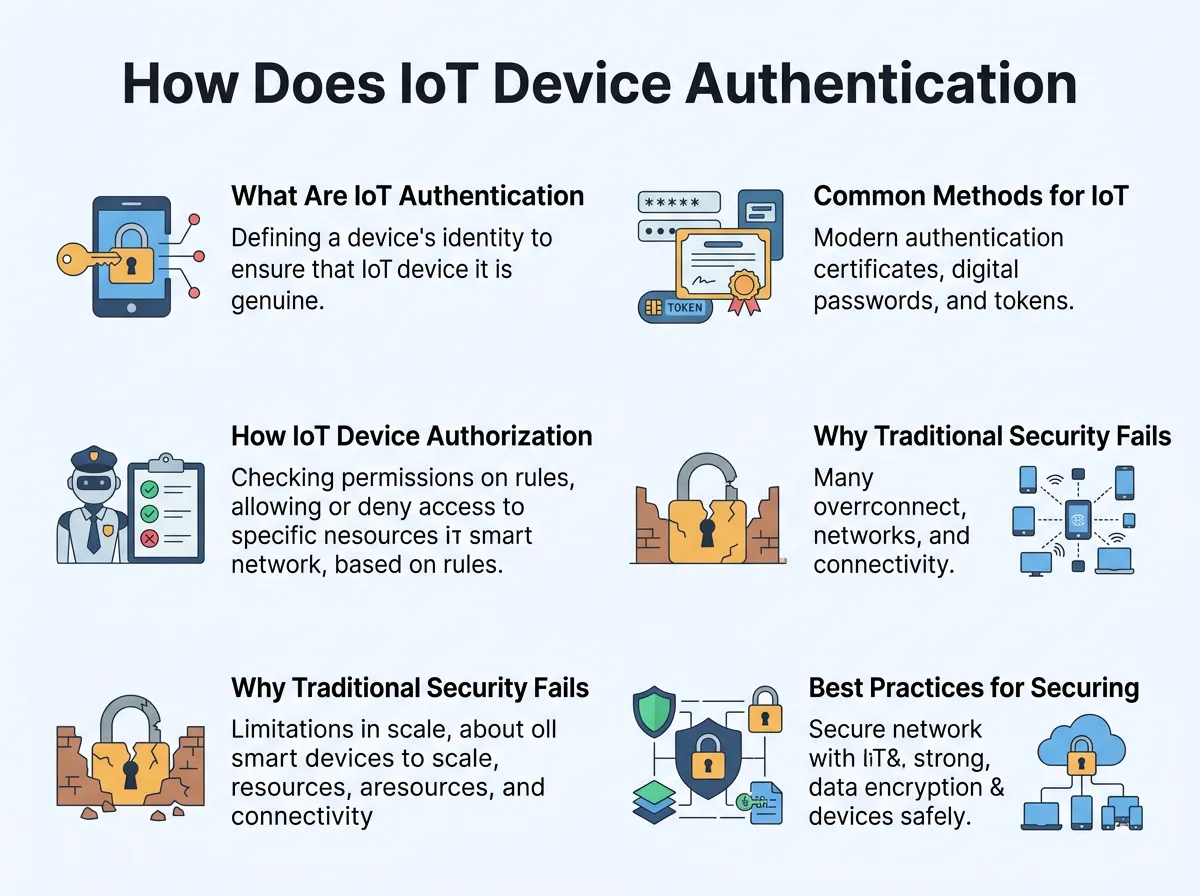
Authentication is the very first step. It asks a simple question: “Who are you?” When a smart tool joins a network, it must prove its identity. It cannot just say its name. It must show proof. This proof can be a password, a key, or a certificate. You can learn more about IoT device authentication to see why proving identity is so critical. Once the network checks this proof, it knows the device can be trusted to join.
What Is Authorization?
Authorization is the second step. It asks a different question: “What are you allowed to do?” Just because a tool is on the network does not mean it can do everything. For example, a smart light bulb should not read your private emails. It only needs to turn on and off. Authorization sets these limits. It defines the rules for each gadget. It makes sure devices only touch the data they need to do their jobs.
Common Methods for IoT Device Authentication
How do smart tools prove their identity? There are a few common ways. Some are simple, while others are highly secure. Choosing the right method depends on the device and the network.
How Does IoT Device Authentication and Authorization Work? — key points at a glance
Pre-Shared Keys (PSKs)
This is the simplest way to secure a device. A single key is saved on the device during manufacturing. The same key is kept on the network server. When the device connects, it uses this key to prove its identity. It is like a secret handshake. It works well for small home setups. However, it is hard to manage when you have thousands of devices. If someone steals the key, the device is no longer safe.
Digital Certificates
This method is much safer than keys. It uses cryptographic keys and a trusted third party. A trusted group gives each device a digital certificate. This certificate is unique to that device. It acts like a digital passport. Many enterprise networks use a public key infrastructure for IoT to manage these certificates. This setup is highly secure and prevents hackers from pretending to be a real device.
Hardware-Based Security
Some high-security devices have a special chip inside. This chip is called a secure element or a Trusted Platform Module (TPM). It stores the cryptographic keys inside physical hardware. Hackers cannot easily read this chip, even if they physically take the device apart. This makes hardware security the gold standard for smart grids and medical tools.
How IoT Device Authorization Works
Once a device proves who it is, it needs permission to act. This is where authorization comes in. It makes sure each device only does what it is supposed to do and nothing more.
Role-Based Access Control (RBAC)
This method groups devices by their roles. For example, all smart cameras belong to a “Cameras” group. This group has permission to send video data. But it does not have permission to change system settings. This keeps roles clear and simple. It makes it easy for network administrators to manage hundreds of devices at once.
Token-Based Authorization
Many modern systems use tokens to grant permission. A device logs in and gets a special digital token. This token has a list of what the device can do. It also has an expiration date so it cannot be used forever. The device must show this token every time it wants to share data. The OAuth 2.0 framework for smart gadgets is a popular way to handle these tokens. It is light, fast, and works well over the internet.
Why Traditional Security Fails for IoT
We use passwords and two-factor tools for our phones and laptops. Why can we not just do the same for smart devices? There are a few main reasons why traditional security does not work well here.
Low Power and Memory Constraints
Many smart devices are very small. They have small batteries and slow processors. They cannot run heavy security software. They do not have the power to do complex math quickly. They need light security tools that do not drain their batteries.
Lack of Human Users
Your smart bulb does not have a screen. It does not have a keyboard. You cannot type in a password every time it connects to the Wi-Fi. The authentication process must be fully automatic. It must happen in the background without any human help.
The Massive Scale of Networks
A smart factory might have ten thousand sensors. You cannot manage them one by one. Traditional systems are not built to handle this many devices. The security system must be able to handle massive numbers of tools without slowing down the network.
Best Practices for Securing Your IoT Network
Are you building a smart network at home or work? Here are some simple tips to keep it safe from bad actors.
Change Default Passwords Instantly
Many gadgets come with easy passwords like “admin” or “1234”. Hackers know these passwords. Always change them to a strong, unique password the moment you set up the device.
Segment Your Network
Keep your smart gadgets on a separate Wi-Fi network. Most modern routers let you set up a guest network. Put your smart TV, lights, and cameras on the guest network. This keeps your main computers and phones safe if a gadget gets hacked.
Keep Software Updated
Always install security updates. Device makers release updates to patch dangerous security holes. Turn on automatic updates if the device allows it. This is one of the easiest ways to stay safe.
A Simple Example of IoT Security in Action
Let us look at how this works in real life. Imagine you have a smart lock on your front door.
Step 1: The Connection Request
You tap your phone to unlock the front door. The smart lock wakes up. It asks to connect to your home smart hub. This is the starting point.
Step 2: Authenticating the Lock
The lock sends its unique digital certificate to your hub. The hub checks this certificate against its list of trusted devices. It confirms that the lock is indeed your lock and not a fake one. The lock has now passed the authentication step.
Step 3: Authorizing the Action
The lock now asks for permission to open. The hub checks the rules. It sees that you are the owner and have full access. The hub sends a secure, short-lived token to the lock. The lock reads the token, sees it has permission, and opens. This is the authorization step. The whole process takes less than a second.
Conclusion
Smart tools make our lives fun and easy. But they must be safe. We now know the answer to our big question: how does IoT device authentication and authorization work? It works by verifying who a device is and then limiting what it can do. By using certificates, keys, and tokens, we can keep our smart homes and offices secure. Always remember to use best practices to keep your devices safe from digital threats.
Frequently Asked Questions
What is the difference between IoT authentication and authorization?
Authentication verifies the identity of an IoT device to prove it is trusted. Authorization determines what resources, data, and actions that specific device is allowed to access. Together, they form a complete security shield for smart networks.
Why are default passwords a risk for IoT devices?
Default passwords are often simple and public knowledge, making them easy targets for hackers. If left unchanged, bad actors can scan the internet and easily take over your device. Always update them to unique passwords immediately.
What is PKI in IoT security?
PKI stands for Public Key Infrastructure, which manages digital certificates for smart devices. It gives each device a unique digital identity that cannot be easily copied or forged. This ensures secure and private communication across the network.
Can a smart light bulb get hacked?
Yes, any connected device can be hacked if it lacks strong security measures. Once hacked, it can be used to gain entry to your main home network. This is why segmenting your network is highly recommended.
What is token-based authorization?
Token-based authorization gives a verified device a digital key called a token. This token defines exactly what the device can do and has a built-in expiration date. It is a highly secure and lightweight way to control device permissions.
How does network segmentation protect IoT devices?
Network segmentation puts your smart devices on a separate guest network away from your main computer. If a hacker takes over a smart gadget, they cannot access your personal files or sensitive data. It creates a digital wall that contains potential security breaches.
