

To collect data from IoT devices, you must connect your smart sensors to a central gateway using lightweight network protocols like MQTT or HTTP. Once connected, this raw data is sent to a secure cloud platform or local server for storage and analysis. By choosing the right hardware, secure networks, and smart storage tools, you can easily turn raw sensor readings into useful insights.
Imagine waking up to a warm cup of coffee. Your coffee maker knew exactly when to start brewing because it talked to your alarm clock. This magic happens because smart devices talk to each other. They gather tiny bits of information every single second. Today, millions of smart devices track everything from room temperature to heart rates. But how does all of this raw information travel from a tiny sensor in your home to a screen in your hand?
If you are building a smart system, you might wonder how to make this work. Gathering info from smart sensors can seem hard at first. There are many different wires, wireless signals, and software tools to think about. Luckily, the process is easy to understand once you break it down into simple steps.
In this guide, we will explore the best ways to gather info from smart devices. We will look at the hardware you need, the best network pathways, and how to keep your data safe. Whether you are a hobbyist or a business owner, this guide will show you how to get started.
Key Takeaways
- Start with Sensors: Choose the right sensors and hardware to capture the exact physical data you need.
- Use Lightweight Protocols: Rely on fast, low-power communication methods like MQTT or CoAP to send your data.
- Set Up Gateways: Use edge gateways to process, filter, and clean your data before it travels to the cloud.
- Choose Safe Cloud Storage: Store your collected data in reliable databases like AWS, Azure, or Google Cloud.
- Focus on Security: Always encrypt your data and update your devices to prevent cyber threats.
📑 Table of Contents
Understanding the Basics of IoT Data Collection
Before we build anything, we need to understand the basics. The term IoT stands for the Internet of Things. It refers to everyday objects that connect to the internet. To build a great system, it helps to start by understanding the Internet of Things (IoT) ecosystem as a whole. Every smart system has three main parts: the device, the network, and the storage system.
What is IoT Data?
IoT data is any information gathered by a smart device. This can be very simple, like a yes-or-no signal from a door sensor. It can also be complex, like a live video feed from a security camera. Most smart devices collect simple numbers like temperature, humidity, speed, or location. These numbers are sent out in small packages at set times.
Why Collect This Data?
We collect this data to make better decisions. For example, a farmer might track soil moisture. This helps the farmer water the crops only when they are dry. This saves water and money. In factories, tracking machine heat can warn workers before a machine breaks down. Knowing how to collect data from IoT devices lets you automate your life and your business.
Step-by-Step Guide on How to Collect Data From IoT Devices
To start gathering information, you must follow a clear plan. Here is the step-by-step path to connect your devices and start reading their signals.
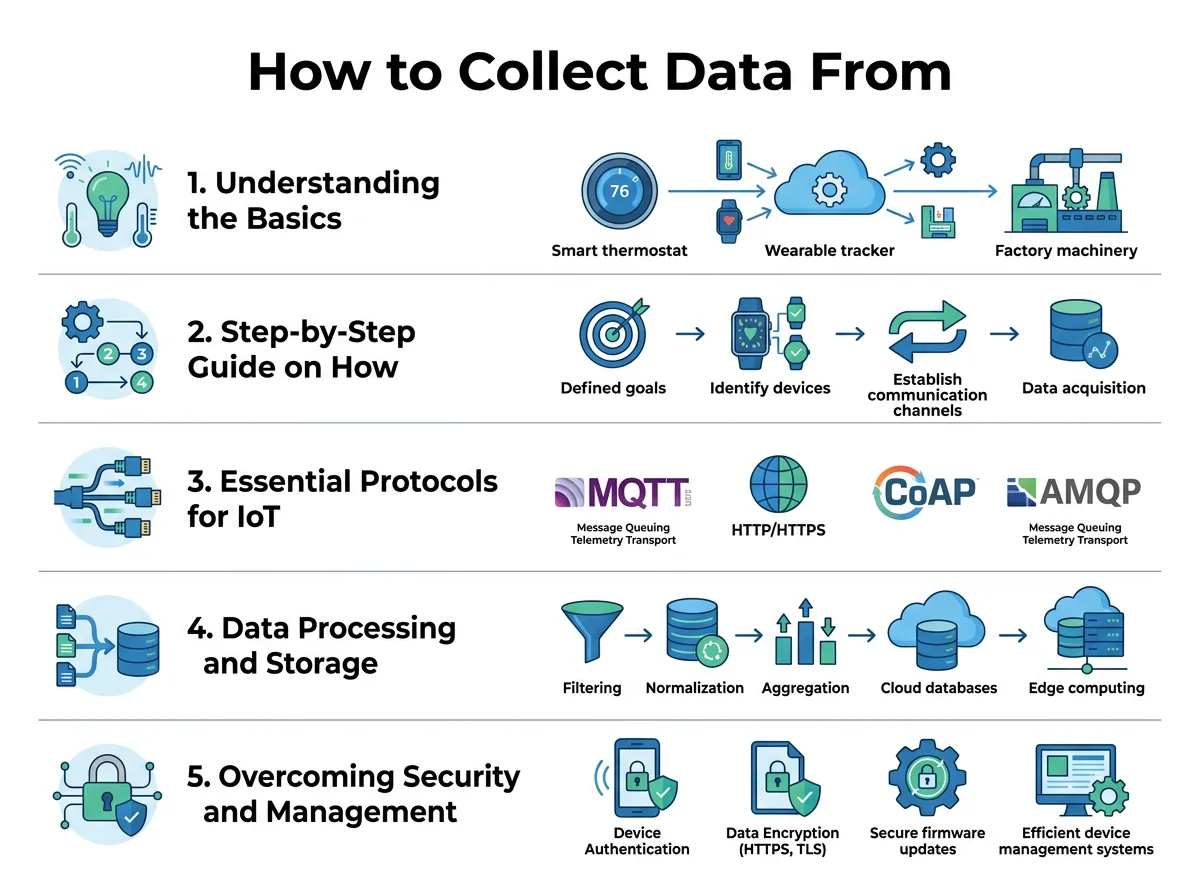
How to Collect Data From IoT Devices? — key points at a glance
Step 1: Choosing the Right Hardware and Sensors
First, you must pick your hardware. You will need sensors to detect changes in the physical world. You will also need a microchip to read those sensors. Many people start with simple boards like an Arduino or a Raspberry Pi. Depending on your project, you might use different types of IoT devices to get the job done. Make sure your hardware fits the environment where you will place it.
Step 2: Selecting a Communication Protocol
Your device needs a language to talk to the outer world. This language is called a protocol. If your device is near a power outlet and a router, you can use Wi-Fi. If your device runs on a small battery in a forest, you might need a low-power network like LoRaWAN or cellular data. The right protocol keeps your device online without draining the battery.
Step 3: Setting Up an Edge Gateway
Sometimes, devices cannot talk to the internet directly. They might be too small or lack the power. In these cases, you use an edge gateway. A gateway is a local hub that collects data from many nearby devices. It groups the data together and sends it to the cloud. Gateways are great because they can filter out useless noise before sending the data.
Essential Protocols for IoT Data Collection
When learning how to collect data from IoT devices, you must choose the right communication protocol. Different projects need different protocols.
MQTT (Message Queuing Telemetry Transport)
MQTT is the most popular protocol for smart devices. It is very lightweight and uses very little battery power. It works on a publish-and-subscribe system. A sensor “publishes” a reading to a central broker. Then, any app that needs that reading “subscribes” to the broker to get it. This makes it perfect for weak or slow internet connections.
HTTP and WebSockets
HTTP is the standard language of the web. It is easy to use and works with almost any server. However, HTTP uses more power and data than MQTT. WebSockets are better for real-time talk because they keep a constant connection open between your device and the server.
CoAP (Constrained Application Protocol)
CoAP is like a simplified version of HTTP designed for small devices. It uses very little data and works well over weak networks. It is ideal for tiny sensors that only need to send quick, occasional updates.
Data Processing and Storage
Once the data leaves your device, it must go somewhere safe. You need a place to store it and tools to read it.
Sending Data to the Cloud
Most projects send data straight to cloud systems. Big brands like Amazon Web Services (AWS), Microsoft Azure, and Google Cloud have special tools for smart devices. These platforms can handle millions of messages every second. They also make it easy to connect your data to visual charts and dashboards.
Clean and Organize Your Data
Raw data from sensors can be messy. It might have errors, missing values, or duplicate messages. Before you use it, you must clean it. For large projects, you should read an essential guide on data wrangling for IoT analytics to learn how to prepare your data for deep analysis. Clean data leads to smart decisions.
Overcoming Security and Management Challenges
Collecting data is not just about connecting wires. You must also protect your devices and your users from hackers.
Securing Your IoT Networks
Smart devices are common targets for cyberattacks. To stay safe, always change the default passwords on your devices. Use encryption so that hackers cannot read your messages as they travel through the air. You should also put your smart devices on a separate Wi-Fi network so they cannot access your personal computer.
Monitoring Your Devices
As your network grows, you will need to manage many devices at once. You must track which devices are online, which ones have low batteries, and which ones need software updates. To keep your network running smoothly, you can learn more about what is IoT device management and how it keeps your systems healthy. Consistent updates will keep your network secure over time.
Practical Real-World Examples
Let us look at how businesses use these steps to solve real problems every day.
Smart Agriculture
A vineyard owner wants to grow the best grapes. They place twenty moisture sensors in the soil across the farm. These sensors use LoRaWAN to send readings to a central gateway in the main barn. The gateway sends the data to a cloud dashboard. The owner can see the exact water levels of the soil from their phone and turn on the sprinklers only when needed.
Smart Cities
Cities use sensors to track traffic flow. Small cameras on traffic lights count the number of cars passing by. This data is sent to a city server using cellular networks. The server changes the timing of the traffic lights in real time to reduce traffic jams. This makes commuting faster and cleaner for everyone.
Conclusion
Learning how to collect data from IoT devices is the key to unlocking the power of smart technology. By choosing the right sensors, using lightweight protocols like MQTT, and securing your network, you can build a reliable system. Start small with a simple project, learn how the pieces fit together, and watch your smart network grow!
Frequently Asked Questions
How do IoT devices send data to the cloud?
IoT devices send data to the cloud using wireless networks like Wi-Fi, cellular, or LoRaWAN. They transmit this information using lightweight protocols such as MQTT or HTTP. Once sent, the data is received and stored by cloud platforms like AWS or Azure.
Which protocol is best for IoT data collection?
MQTT is generally the best protocol for IoT data collection because it is lightweight and uses very little power. It is designed specifically for weak networks and battery-powered devices. For simple web-based setups, HTTP or WebSockets can also work well.
Can I collect IoT data without an internet connection?
Yes, you can collect IoT data offline by saving it to a local gateway or an SD card on the device. Once a local connection is established, you can transfer the data to a local server. You can also upload it to the cloud later when an internet connection becomes available.
Why is security important in IoT data collection?
Security is vital because IoT devices often collect sensitive personal or industrial information. Unsecured devices can be hacked, allowing attackers to steal data or control your hardware. Using encryption and strong passwords keeps your network safe from these threats.
What is an IoT gateway and do I need one?
An IoT gateway is a physical device or software program that connects your smart sensors to the cloud. It acts as a bridge, translating different device protocols and filtering data before sending it online. You need a gateway if your individual sensors cannot connect to the internet directly.
How do I handle dirty or missing IoT data?
You can handle messy IoT data by using data cleaning tools and algorithms before storing it. Edge gateways can filter out duplicate messages or clear out obvious reading errors. This process ensures that only high-quality data reaches your final database.
