

IoT mobile app development is the process of creating smartphone applications that connect to and control physical smart devices. This complex workflow bridges the gap between hardware and software through APIs, cloud databases, and secure networks. By understanding how these layers interact, businesses can build seamless, user-friendly experiences that bring everyday physical objects to life.
Imagine waking up on a cold morning. Before you even get out of bed, you tap your smartphone screen. Downstairs, your coffee maker starts brewing a fresh pot, the home thermostat raises the temperature to a cozy level, and your bedroom blinds slowly roll open to let in the morning light. This is not a scene from a science fiction movie. It is the everyday reality of the Internet of Things (IoT). Today, we use smart devices for everything from home security to personal fitness tracking.
Creating these smart systems requires a unique blend of physical engineering and digital software design. If you are a business owner, a curious tech lover, or an aspiring creator, you might ask: How Does IoT Mobile App Development Work? Understanding this process is the first step toward building a successful smart product. In this article, we will break down the entire process into simple, easy-to-understand phases. We will explore the core architecture, the technology stack, and the essential steps to turn a simple idea into a functional smart system.
Let us take a friendly journey into the world of connected devices. By the end of this guide, you will know exactly how developers build the apps that bring our physical world to life.
Key Takeaways
- Hardware-Software Synergy: Success depends on seamless communication between smart physical devices and the mobile interface.
- The Four-Layer Architecture: IoT apps rely on a structured architecture comprising the device, gateway, cloud platform, and application layers.
- Connectivity Protocols: Developers must choose the right protocols like Wi-Fi, Bluetooth, Zigbee, or cellular networks based on range and battery needs.
- Security First: Robust data encryption and secure authentication are critical to protect sensitive user data from cyber threats.
- Real-Time Data Processing: Apps must handle continuous data streams efficiently to provide instant feedback and actions.
- User-Centric Design: Clean, simple UI/UX is essential for helping users easily manage complex physical hardware.
📑 Table of Contents
Understanding the Core Pillars of IoT App Development
Before we dive into the actual development process, we need to look at the foundation. An IoT mobile app does not work in isolation. It is part of a larger ecosystem made of four main parts. Think of these parts as players in a relay race. If one player drops the baton, the entire race is lost.
The Smart Device (The Hardware)
This is the physical object you want to control. It could be a smart light bulb, a wearable fitness tracker, or a giant industrial machine. These devices have built-in sensors and microcontrollers. The sensors collect data from the environment, such as temperature, speed, or heart rate. But a smart device cannot do much with this data on its own. It needs to send this information somewhere else to make it useful.
The Gateway (The Translator)
The gateway acts as a bridge. Often, smart devices use low-energy signals that cannot connect directly to the internet. The gateway collects these local signals and translates them into a language that the internet can understand. Your home Wi-Fi router is a perfect everyday example of a gateway. It takes signals from your smart devices and sends them out to the wider web.
The Cloud (The Brain)
If the smart device is the body, the cloud is the brain. The cloud is a network of powerful servers that store and analyze data. When your smart thermostat sends temperature readings, the cloud processes this data. It decides if your home is too hot or too cold. It then stores this data so you can look at your energy usage history later. The cloud does the heavy lifting so your mobile phone does not have to.
The Mobile App (The Controller)
Finally, we have the mobile app. This is the screen you touch and interact with. It serves two main purposes. First, it displays the data collected by the smart device in a beautiful, easy-to-read format. Second, it lets you send commands back to the device. When you press a button on your screen, the command travels through the cloud to the physical device in milliseconds.
How Does IoT Mobile App Development Work? The Step-by-Step Process
Now that we know the key players, let us answer the big question: How Does IoT Mobile App Development Work? Building one of these apps requires a careful, step-by-step approach. Unlike standard mobile apps, IoT apps must interact with the physical world. Here is the step-by-step roadmap that developers follow.
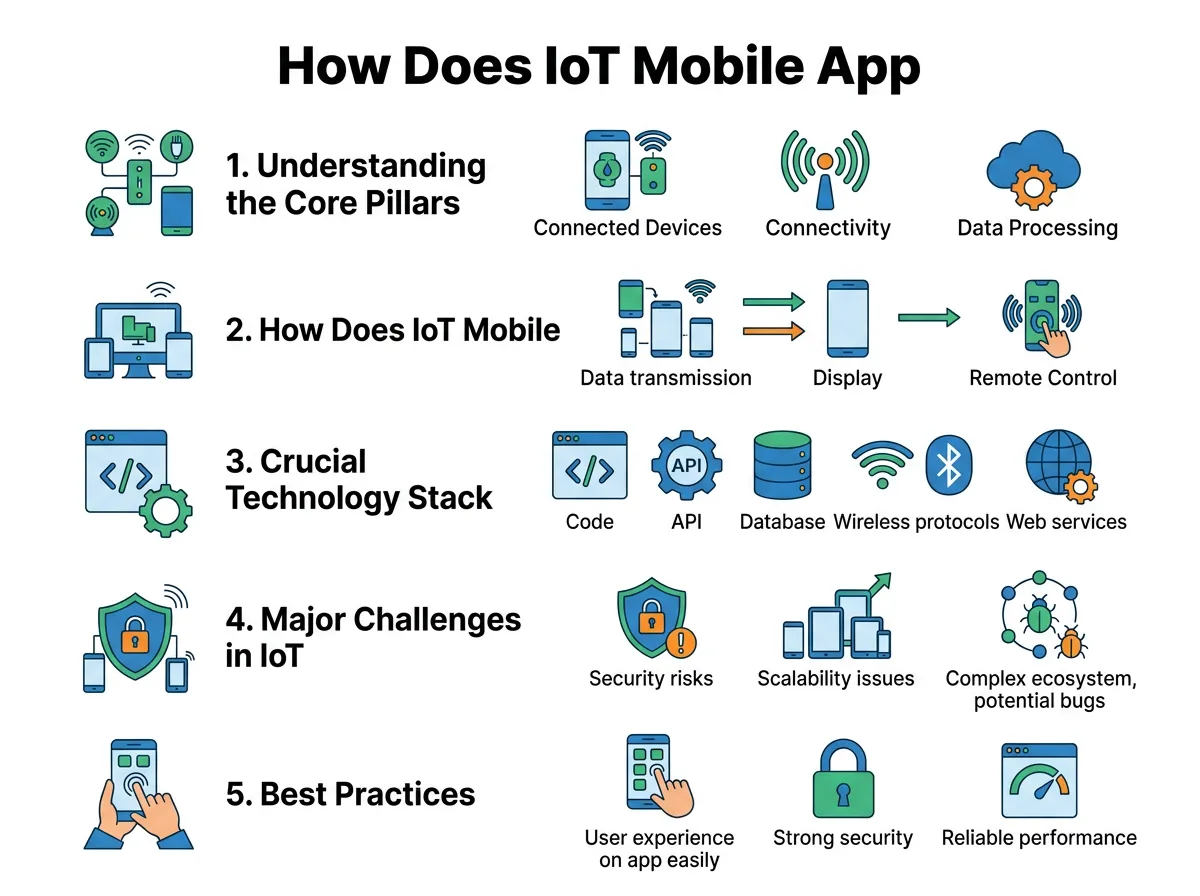
How Does IoT Mobile App Development Work? — key points at a glance
Phase 1: Planning and Hardware Selection
Every great project starts with a plan. In this initial phase, you must define exactly what your smart system will do. What problem does it solve? Who will use it? Once you have a clear vision, you must select the right hardware. Developers must work closely with hardware engineers. When thinking about how does IoT mobile app development work, hardware compatibility must always be the starting point. You need to ensure that the sensors and chips in your physical product can easily talk to mobile operating systems like Android and iOS.
Phase 2: Choosing the Right Connectivity Protocols
How will your device talk to your phone? This is a crucial decision. The choice depends on your device’s battery life, data speed needs, and physical range. Here are the most common options:
- Wi-Fi: Great for high-speed data transfer, but it consumes a lot of power. Ideal for plugged-in devices like smart TVs.
- Bluetooth Low Energy (BLE): Perfect for short-range communication. It uses very little battery, making it the top choice for wearables.
- NFC (Near Field Communication): Used for extremely close-range data transfers, such as contactless payments.
- Cellular (4G/5G): Essential for devices that operate outdoors over long distances, such as smart tracking systems for delivery trucks.
Phase 3: Designing the User Experience (UI/UX)
Smart apps can easily become confusing because they deal with complex data. A great UI/UX designer keeps things simple. The user should not need a manual to turn on a light bulb. The design team focuses on clean dashboards, clear buttons, and fast response times. They also design how the app behaves when the internet connection drops. Good design ensures that the app remains helpful even in offline mode.
Phase 4: Coding the App and API Integration
This is where the magic happens. Software engineers write the code that brings the design to life. To make the app talk to the smart device, developers use Application Programming Interfaces (APIs). APIs act as secure digital pipelines. They allow the mobile app, the cloud database, and the physical device to share information instantly. Security is also coded into the app during this phase to protect user privacy.
Phase 5: Rigorous Testing
Testing an IoT app is much harder than testing a regular app. Developers cannot just test the code on a computer screen. They must test the app with the actual physical hardware. They test for weak signals, battery drain, and system crashes. They also test how the app handles extreme conditions, such as sudden power outages or lost internet connections. Only when the hardware and software work together perfectly is the app ready for launch.
Crucial Technology Stack for IoT Mobile Apps
To understand the mechanics of this process, we must look at the tools developers use. Choosing the right tech stack is like choosing the right materials to build a house. It determines how strong and reliable your final app will be.
Programming Languages
For native app development, creators use Swift for iOS devices and Kotlin for Android. However, many developers prefer cross-platform frameworks. Tools like Flutter and React Native allow developers to write code once and deploy it to both iOS and Android. If you wonder how does IoT mobile app development work on different operating systems, cross-platform tools are often the best answer. This approach saves time and ensures a consistent experience across all devices.
IoT Platforms and Cloud Services
Building a custom cloud server from scratch is expensive and time-consuming. Instead, developers use pre-built IoT platforms. These platforms provide ready-to-use cloud storage, security tools, and data analytics. Some of the most popular platforms include AWS IoT Core, Microsoft Azure IoT Suite, and Google Cloud IoT. These tools handle billions of messages daily, making them incredibly reliable.
Major Challenges in IoT Mobile App Development
While the benefits of smart apps are clear, building them is not always easy. Developers must overcome several unique challenges along the way. Here are the most common hurdles you might face.
Ensuring Strong Security and Data Privacy
Because IoT devices collect personal data, they are prime targets for hackers. A compromised smart camera or door lock can put a user’s safety at risk. Protecting user credentials and personal data is a critical part of how does IoT mobile app development work in real-world scenarios. Developers must use strong data encryption to protect information as it travels between devices. They also implement two-factor authentication to ensure only authorized users can access the system.
Handling Device Compatibility and Fragmentation
There are thousands of different smartphone models, operating system versions, and smart hardware chips. Ensuring that your app works perfectly on all of them is a massive challenge. Developers must write flexible code and run extensive tests on many different devices to ensure consistent performance.
Minimizing Battery and Resource Consumption
Constant communication between a phone and a smart device can drain both batteries quickly. To solve this, developers must optimize how often the app syncs data. Instead of constant streaming, the app can send data in small, efficient bursts. This keeps the devices running longer without needing a charge.
Best Practices for a Successful IoT App Launch
If you want your smart app to succeed in a competitive market, keep these three expert tips in mind.
Focus on Offline Functionality
Do not assume your users will always have a perfect internet connection. Your app should still perform basic tasks offline using local Bluetooth connections. For example, a smart lock should still unlock your door even if your home Wi-Fi is temporarily down.
Build Scalable Cloud Architecture
Your app might start with a few hundred users, but what happens when you grow to hundreds of thousands? Ensure your cloud infrastructure is scalable. It should be able to handle sudden spikes in traffic without slowing down or crashing.
Gather Continuous User Feedback
The launch is not the end of the journey; it is just the beginning. Watch how your users interact with your app. Listen to their feedback and release regular updates to fix bugs, improve speed, and add new features. This keeps your users happy and loyal.
Conclusion
So, How Does IoT Mobile App Development Work? As we have seen, it is a fascinating journey that blends physical hardware with smart digital code. By linking sensors, gateways, cloud networks, and mobile interfaces, developers create seamless systems that simplify our daily lives. While the development process has its share of challenges, the rewards are immense. With the right planning, a strong tech stack, and a focus on user security, you can build an app that truly changes how we interact with the physical world. The future is connected, and your next big app idea could be the key to unlocking it.
Frequently Asked Questions
What is IoT mobile app development?
It is the process of building smartphone applications that connect, control, and communicate with physical smart devices. These apps allow users to interact with hardware like smart home devices, fitness trackers, and industrial machines through their phones.
Which wireless technologies do IoT apps use to connect?
IoT apps use various protocols depending on the device’s battery life and range needs. The most common options include Wi-Fi, Bluetooth Low Energy (BLE), Zigbee, Near Field Communication (NFC), and cellular networks like 4G or 5G.
Can an IoT mobile app work without an internet connection?
Yes, many IoT apps can perform basic control functions without an internet connection by using local communication protocols like Bluetooth. However, they will need an active internet connection to sync data with the cloud or update settings remotely.
What are the biggest challenges in building IoT mobile apps?
The biggest challenges include securing user data from cyber threats, ensuring the app works across many different hardware chips and smartphone models, and minimizing battery drain on both the phone and the smart device.
How do developers secure IoT mobile applications?
Developers secure these apps by using advanced end-to-end data encryption, requiring multi-factor user authentication, and regularly updating the software. They also implement secure communication protocols to prevent hackers from intercepting data between devices.
Do I need a custom cloud server for my IoT mobile app?
You do not need to build a cloud server from scratch because you can use reliable pre-built platforms. Services like AWS IoT Core, Google Cloud IoT, and Microsoft Azure IoT offer secure, scalable, and ready-to-use cloud environments for your application.
