


A Wi-Fi indoor positioning system works by measuring radio signals between your smartphone and nearby Wi-Fi routers. By analyzing signal strength or travel time, smart algorithms can pinpoint your exact location on an indoor map. This technology bridges the gap where GPS fails, enabling seamless navigation inside large buildings.
Imagine walking into a massive international airport, carrying two heavy bags, and realizing your flight departs in fifteen minutes. You open your phone’s map app, hoping for a quick route to Gate 42. However, the blue dot on your screen sits frozen. It places you in the middle of a nearby highway. This happens because GPS satellites require a clear line of sight, and thick concrete roofs completely block their signals.
Thankfully, modern technology has a brilliant solution to this frustrating problem. By utilizing the wireless networks already surrounding us, we can navigate complex indoor spaces with ease. But how do our phones know exactly where we are standing when we are deep inside a concrete structure?
In this guide, we will unpack how this technology works. We will explore the simple physics of radio signals, look at the math that calculates your position, and see how businesses use these systems to make indoor travel simple and stress-free.
Key Takeaways
- GPS Alternative: Indoor positioning systems use existing Wi-Fi networks because satellite GPS signals cannot penetrate building walls.
- Signal Measurement (RSSI): The system calculates distance by measuring how strong or weak the Wi-Fi signal is when it reaches your device.
- Fingerprinting Method: This technique maps the unique signal patterns of a building beforehand to identify locations later with high accuracy.
- Trilateration Math: By crossing distance data from at least three different Wi-Fi routers, the system finds your exact coordinates.
- Affordable Setup: Businesses can often deploy this technology using their existing Wi-Fi routers, saving on hardware costs.
📑 Table of Contents
The Big Problem with GPS Indoors
To understand why we need a specialized indoor system, we first need to look at how outdoor navigation works. Global Positioning System (GPS) relies on satellites orbiting thousands of miles above Earth. These satellites send out radio signals that travel through space and the atmosphere to reach your phone.
While these signals are great for open roads, they are incredibly weak. When they hit obstacles like glass, steel, wood, and concrete, they bounce around or get absorbed. This means GPS cannot give you accurate coordinates inside a shopping mall, a multi-story hospital, or an underground subway station. To solve this issue, engineers had to look for a signal source that was already abundant indoors. They found the perfect answer in the humble Wi-Fi router.
What is a Wi-Fi Indoor Positioning System?
A Wi-Fi indoor positioning system is a network of hardware and software designed to locate assets or people inside a building. Instead of looking up at space, this system looks around the room. It uses the local wireless infrastructure to calculate positions. Because most modern public and private buildings already have wireless networks installed, this setup is highly accessible and cost-effective.
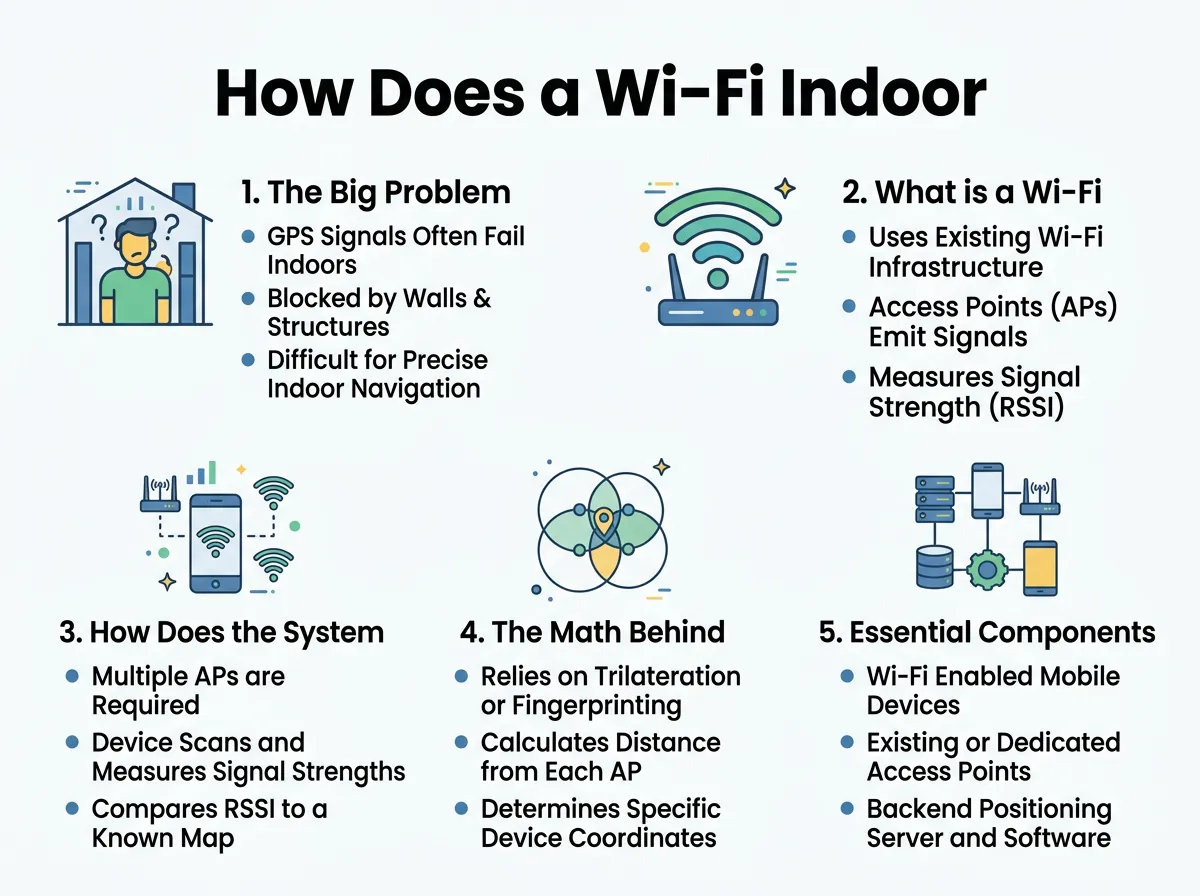
How Does a Wi-Fi Indoor Positioning System Work? — key points at a glance
To get a deeper look at the history and technical framework of this technology, you can read about the Wi-Fi positioning system on Wikipedia. Today, these systems are common in universities, corporate offices, and massive transit hubs.
How Does the System Calculate Your Location?
The system relies on communication between two main components: a transmitter and a receiver. Your smartphone acts as one, and the building’s Wi-Fi access points act as the other. There are two primary ways the system measures these signals to find your location.
1. Received Signal Strength Indication (RSSI)
The simplest and most common method is called RSSI. Think of a Wi-Fi router like a person shouting in a room. If you are standing right next to them, the shout is very loud. As you walk away, the sound gets quieter.
In the same way, your phone measures the power of the Wi-Fi signal. A strong signal means you are close to the router. A weak signal means you are far away. By measuring the signal strength from multiple routers at the same time, the system can estimate your distance from each one.
2. Wi-Fi Fingerprinting
Sometimes, walls and furniture cause signals to bounce, making RSSI measurements inaccurate. To solve this, engineers use a method called fingerprinting. This process has two distinct phases:
- The Offline Phase: Engineers walk through the building and measure the unique Wi-Fi signal mix at various points. They record which routers are visible and how strong they are at every single coordinate. This data is saved in a master database, creating a “signal map” of the building.
- The Online Phase: When you walk through the building with your phone, the app compares your current Wi-Fi signal mix with the master database. It finds the closest match and displays your location instantly.
If you want to explore how these phases work in real-world deployments, you can check out infsoft’s guide on Wi-Fi positioning basics.
The Math Behind the Magic: Trilateration
Once the system gathers signal data, it needs to translate those numbers into a dot on a map. It does this using a mathematical process called trilateration.
Imagine you are lost in a building. Router A tells your phone that you are exactly ten feet away. This means you could be anywhere on a circle with a ten-foot radius around Router A. Now, Router B tells you that you are fifteen feet away from its location. By drawing both circles on a map, they overlap at two specific points.
To solve the mystery, we introduce Router C. If Router C says you are eight feet away, we draw a third circle. All three circles will intersect at only one single point. That intersection is your exact location. The positioning software performs these complex geometric calculations in milliseconds, giving you a smooth, real-time blue dot on your screen.
Essential Components of an Indoor Positioning System
For a Wi-Fi indoor positioning system to work seamlessly, several components must talk to each other in real-time. Here are the key pieces of the puzzle:
Wi-Fi Access Points
These are the standard routers mounted on walls and ceilings. For high-accuracy tracking, a building needs a dense layout of access points. The more routers your phone can “hear,” the more accurate the calculations will be.
Mobile Clients and Tags
This is the device being tracked. It can be a customer’s smartphone running a venue’s app, or a small battery-powered Wi-Fi tag attached to a valuable piece of hospital equipment.
The Positioning Engine
This is the brain of the system. It can live on a local server or in the cloud. The engine receives the signal data, runs the trilateration math, filters out signal noise, and sends the final coordinates back to the user’s screen.
Real-World Applications
This technology is not just a cool science project. It provides immense value to businesses and customers every single day.
In retail, large department stores use indoor positioning to guide shoppers directly to the items on their grocery lists. It also allows retailers to send digital coupons to your phone when you stand in front of a specific shelf.
In healthcare, hospitals use Wi-Fi tracking to monitor expensive mobile medical equipment, like ventilators or wheelchairs. Instead of nurses wasting hours searching hallways, they can look at a digital dashboard to see exactly where the equipment is parked. For more examples of how industries use these tracking maps, you can review Navigine’s insights on Wi-Fi tracking.
Common Challenges and Solutions
While Wi-Fi positioning is highly effective, it does face some unique indoor obstacles. Here is how engineers keep systems running smoothly:
1. Signal Interference
People, metal doors, and even water pipes can block or reflect Wi-Fi signals. To counter this, modern positioning engines use advanced filters. These smart algorithms ignore sudden, temporary drops in signal strength, keeping the map dot steady.
2. Device Variety
An iPhone catches Wi-Fi signals differently than a Samsung or a Google Pixel device. If the system does not account for this, the location data can be incorrect. Developers solve this by calibrating their software to recognize different phone models and adjust the calculations accordingly.
3. Battery Drain
Constant Wi-Fi scanning can drain a smartphone’s battery. To prevent this, modern systems only trigger scans when the phone’s internal motion sensors detect that the user is actually walking.
Conclusion
A Wi-Fi indoor positioning system is a brilliant marriage of everyday hardware and advanced mathematics. By transforming the wireless routers we already use into a digital compass, it solves the age-old problem of indoor navigation. Whether you are navigating a massive airport, searching for a specific product in a store, or tracking assets in a warehouse, this technology ensures you will never truly be lost indoors again.
Frequently Asked Questions
Does indoor Wi-Fi tracking require an internet connection?
No, your device does not need active internet access to be located. The system only needs your phone to detect the radio signals emitted by nearby Wi-Fi access points.
How accurate is a Wi-Fi indoor positioning system?
Typically, a standard Wi-Fi positioning system is accurate within two to five meters. This accuracy can be improved further by increasing the density of the wireless access points in the building.
Is my privacy protected when using indoor Wi-Fi tracking?
Yes, reputable systems protect your privacy by using randomized MAC addresses and encrypting data. Most user-facing applications also require you to opt-in and grant location permissions before tracking begins.
Can this technology work on any smartphone?
Yes, almost all modern smartphones equipped with a standard Wi-Fi microchip can use this technology. No special hardware upgrades are required on the user’s end.
What is the difference between RSSI and Wi-Fi fingerprinting?
RSSI estimates your distance based on real-time signal strength from nearby routers. Fingerprinting matches your current signal patterns against a pre-recorded database of the building’s signals for higher accuracy.
Can Wi-Fi positioning track devices across different floors?
Yes, because Wi-Fi signals travel in three dimensions, the system can analyze signal changes to determine if you have moved up an escalator or elevator to a different floor.
