


Testing IoT devices requires a comprehensive strategy that spans hardware, software, connectivity, and security. By simulating real-world usage and focusing on end-to-end integration, teams can ensure their smart products run smoothly, safely, and efficiently. Our guide outlines the essential steps, tools, and best practices to master this complex testing landscape.
Imagine you just bought a brand-new smart lock for your front door. You tap your phone, but nothing happens. Or worse, the door unlocks for a complete stranger. When smart devices fail, they do not just cause minor glitches. They can create real-world safety hazards. That is why learning how to test Internet of Things devices is so vital today.
Our world is filling up with smart gadgets. From watches to refrigerators, everything is getting connected. This massive network makes up the growing ecosystem of the Internet of Things (IoT). But how do we make sure these devices work safely and smoothly? It takes a mix of unique skills, smart planning, and the right tools.
In this guide, we will break down the entire process. We will look at the different layers of smart devices. We will also share simple steps and tools to help you run your own tests. Whether you are a developer, a QA engineer, or just curious, you will find practical tips to get started.
Key Takeaways
- Multi-Layered Approach: Effective testing covers hardware, firmware, cloud services, and mobile apps.
- Security First: Always prioritize data encryption, API security, and vulnerability assessments to protect user privacy.
- Real-World Connectivity: Network tests must simulate weak signals, drops, and protocol transitions.
- Scalability via Emulation: Virtual emulators allow teams to simulate thousands of devices for load testing.
- Continuous Monitoring: Testing should continue even after launch to catch post-release bugs and monitor performance.
📑 Table of Contents
Understanding the IoT Testing Ecosystem
Before you learn how to test Internet of Things devices, you must understand what makes them unique. A standard mobile app is self-contained. It lives on your phone and talks to a server. An IoT system is much more complex. It is a web of many moving parts that must work together perfectly.
The Core Components of an IoT System
Every IoT system has three main parts. First, there is the physical hardware. This is the device itself, like a smart bulb, a medical tracker, or a sensor. Second, there is the software. This includes the internal code, called firmware, and the mobile apps you use to control the device. Third, there is the cloud backend. This is where data is saved, processed, and shared.
If you want to know how to test Internet of Things devices effectively, you cannot just focus on one part. You must test how they talk to each other. If the hardware is great but the cloud app is slow, the whole product feels broken.
Key Types of Testing for Smart Devices
To ensure a smart product is ready for the market, you must run several types of tests. Designing a comprehensive IoT testing strategy is the best way to catch bugs early. Let us look at the most important test categories you should focus on.
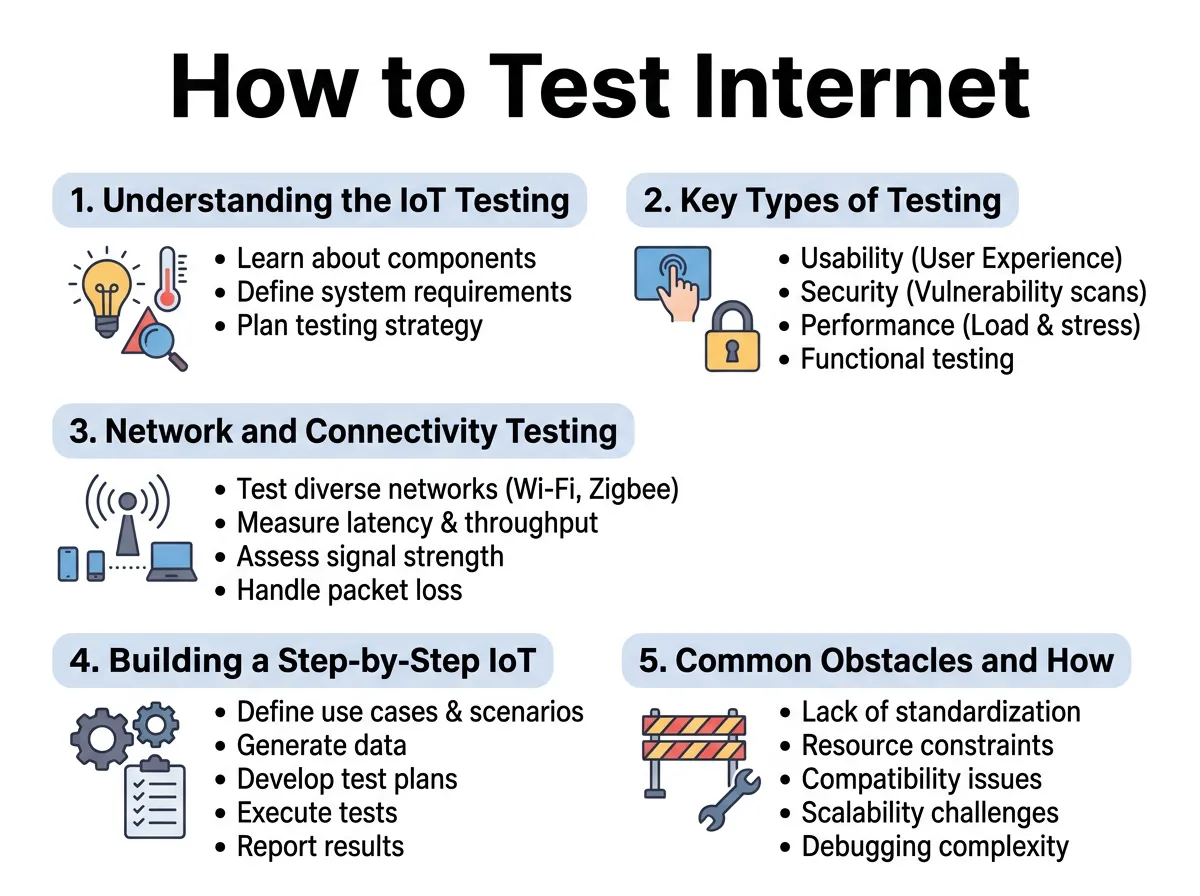
How to Test Internet of Things Devices? — key points at a glance
Functional and Usability Testing
Functional testing checks if the device does what it is supposed to do. If you press “turn on” on your app, does the smart light turn on? You must test every button, screen, and feature. Usability testing goes a step further. It asks if the device is easy and pleasant to use. Can a non-technical person set up the device in under five minutes? If the setup is too hard, users will return the product.
Security and Data Privacy Testing
Security is a massive concern for smart devices. Hackers love targeting weak IoT products to gain access to private networks. You must test for secure data encryption both when data is sent over the air and when it is stored. Always check if the device forces users to change default passwords during setup. You should also run vulnerability scans on all APIs to prevent data leaks.
Performance and Load Testing
What happens when thousands of people use their smart devices at the exact same time? Performance testing helps you find out. You must simulate heavy traffic to see if your cloud servers can handle the load. This ensures the system does not crash during peak hours, like when everyone turns on their smart heaters on a cold winter morning.
Network and Connectivity Testing Challenges
The internet is not always perfect. Sometimes signals drop, routers reboot, or bandwidth slows down. A smart device must be ready for these real-world issues.
Simulating Unstable Network Conditions
When you are learning how to test Internet of Things devices, you must learn to play dirty. Do not just test on fast office Wi-Fi. Try testing with weak signals and slow speeds. See what happens when the device loses its connection completely. Does it reconnect automatically when the signal returns? Does it save data locally while offline and sync later? Understanding how connectivity impacts user experience is key to building a reliable product.
Protocol and Interoperability Testing
Smart devices use many wireless protocols to talk. These include Wi-Fi, Bluetooth, Zigbee, and cellular networks. You must test if the device switches between these protocols smoothly. For example, a smart watch should transition from Bluetooth to Wi-Fi without losing your workout data. You also need to test how the device works with other smart home systems like Apple HomeKit or Google Home.
Building a Step-by-Step IoT Test Plan
Now that you know what to test, let us look at how to organize your efforts. A structured plan keeps your team on track and ensures you do not miss any critical bugs.
Phase 1: Requirement Gathering and Threat Modeling
Start by writing down exactly what the device should do. Define the hardware limits, battery life goals, and network needs. Next, do a threat modeling session. Identify where the device is most vulnerable to attacks. This helps you prioritize your security tests early in the cycle.
Phase 2: Environment Setup and Tool Selection
Set up a dedicated lab for your testing. You will need a mix of real physical devices and virtual simulators. You may also need specialized hardware testing equipment to measure power consumption and signal strength. Choose tools that help you automate repetitive tasks so you can save time.
Phase 3: Test Execution and Continuous Monitoring
Run your tests in stages. Start with unit tests on the code, then move to integration tests. Finally, perform end-to-end testing with real users in real environments. Once the device is in the market, keep monitoring it. Use analytics to track performance and catch new bugs before your users do.
Common Obstacles and How to Overcome Them
Testing IoT devices is not always easy. You will likely face a few hurdles along the way. Here is how to handle them like a pro.
Handling Hardware Resource Constraints
Many smart devices are tiny. They have small chips, very little memory, and tight battery limits. This makes it hard to run heavy test scripts directly on the device. To solve this, focus on testing the firmware in small, modular chunks. You can also monitor battery drain during different states to optimize power use.
Scalability and Emulator Limitations
You cannot buy 10,000 physical smart plugs just to test your server limits. Physical devices are expensive and take up space. Instead, use virtual emulators to simulate large fleets of devices. This allows you to test how your system scales without breaking your budget.
Essential Tools for IoT Testers
Having the right tools makes a huge difference. Here are a few must-have tools for your testing toolkit:
- Wireshark: This tool helps you capture and analyze the network traffic sent by your device. It is great for spotting unencrypted data.
- JMeter: Use this to simulate thousands of virtual devices. It helps you run heavy load tests on your cloud servers.
- MQTT.fx: A simple tool to test the MQTT protocol, which is very common in smart devices. It lets you publish and subscribe to data feeds easily.
- Postman: Perfect for testing the APIs that connect your mobile app, cloud backend, and physical device.
Final Thoughts
Learning how to test Internet of Things devices is a highly rewarding journey. Smart devices are complex, but they can be mastered with a clear strategy. By focusing on security, network stability, and user experience, you can build products that people trust and love. Always remember that testing is not a one-time step. It is an ongoing process that keeps your smart devices smart, safe, and reliable for years to come.
Frequently Asked Questions
What is the main challenge of IoT testing?
The main challenge is the complexity of testing many different components like hardware, firmware, network protocols, cloud backends, and mobile apps all at once. This requires a broad range of testing skills and tools.
Why is security testing so important for IoT devices?
IoT devices often handle sensitive user data and connect directly to private home or corporate networks. Weak security can allow hackers to hijack devices, steal private information, or launch attacks on other systems.
Can I test IoT devices without real hardware?
Yes, you can use device simulators and virtual emulators for early testing and heavy load simulation. However, you should always perform final tests on physical hardware to ensure real-world reliability.
What protocols are tested in IoT connectivity?
Common protocols include Wi-Fi, Bluetooth, Zigbee, Z-Wave, cellular, and MQTT. Testing ensures the device communicates reliably across these channels even under weak signal conditions.
How does network latency affect IoT devices?
Network latency can delay command execution and cause sync issues between the device and the companion app. Testing under high latency helps ensure the device handles communication delays gracefully without crashing.
What is the role of automation in IoT testing?
Automation helps run repetitive tests, like firmware regression and API checks, much faster than manual testing. It allows testing teams to scale their efforts and find critical bugs early in the development lifecycle.
