


Distributed IoT devices often miss critical over-the-air (OTA) updates due to unreliable network connectivity, sudden power failures, and severe memory constraints. These failures are further compounded by software state conflicts, expired security certificates, and a lack of robust rollback mechanisms. Understanding these vulnerabilities is the first step toward building a highly resilient update pipeline for your hardware fleet.
Imagine you manage a fleet of ten thousand smart parking meters spread across fifty cities. One morning, you roll out a critical security patch to fix a major vulnerability. By afternoon, your dashboard shows a frustrating reality. Only seventy percent of your devices successfully updated. The rest are completely dark, running old software, or stuck in limbo. You ask yourself: what went wrong? Why did so many units fail to receive the software they need?
Deploying updates to physical hardware in the wild is vastly different from updating cloud software. When cloud servers update, they do so in controlled environments with stable power and fast networks. Edge devices live in the messy real world. They face unpredictable weather, spotty signals, and hardware limits. To keep your fleet healthy, you must understand exactly what causes distributed devices to miss OTA updates.
Let us look at the primary reasons why these updates fail. We will also explore how you can design your systems to overcome these real-world obstacles.
Key Takeaways
- Intermittent Connectivity: Weak cellular or Wi-Fi signals frequently drop network packets mid-download, causing update failures.
- Power Loss and Drops: Devices running on low batteries or unstable grids may shut down during the critical flashing process, causing bricked hardware.
- Storage and Memory Limits: Edge devices often lack the local storage space needed to download and unpack large update files.
- Expired Security Certificates: Out-of-date security keys or misaligned device clocks block secure connections to the OTA update server.
- Operational State Conflicts: If a device is performing a safety-critical task, it may reject or delay updates to prevent local hazards.
- Mitigation is Key: Using dual-bank flash memory (A/B updates) and smart retry patterns can prevent almost all update failures.
📑 Table of Contents
The Network Mirage: Unstable and Intermittent Connectivity
We often assume that the internet is always available. However, for edge devices, stable connectivity is a luxury. Network issues are the single most common answer when looking at what causes distributed devices to miss OTA updates.
The Reality of Weak Signals
Many smart devices live in harsh spots. They are buried in concrete basements, mounted on high utility poles, or moving inside delivery trucks. These environments suffer from weak cellular or Wi-Fi signals. A device might have enough signal strength to send a tiny data packet once an hour. Yet, that same signal might fail when trying to download a fifty-megabyte firmware file. The connection drops mid-download, the file corrupts, and the update fails.
Protocol Overhead and Timeouts
Many IoT systems use lightweight protocols like MQTT or CoAP. These protocols are great for small messages. However, they struggle with large binary payloads. If the network speed drops, the connection times out. If your system does not support resuming interrupted downloads, the device must start over from zero. On a weak connection, this loop repeats forever. The device simply never finishes the download.
Tip: Always use an OTA platform that supports partial downloads. If a connection drops, the device should resume downloading from the exact byte where it left off.
Power Disturbances and Sleep Cycles
A device cannot write new software to its memory if it does not have the power to do so. Power issues cause countless missed updates in the field.
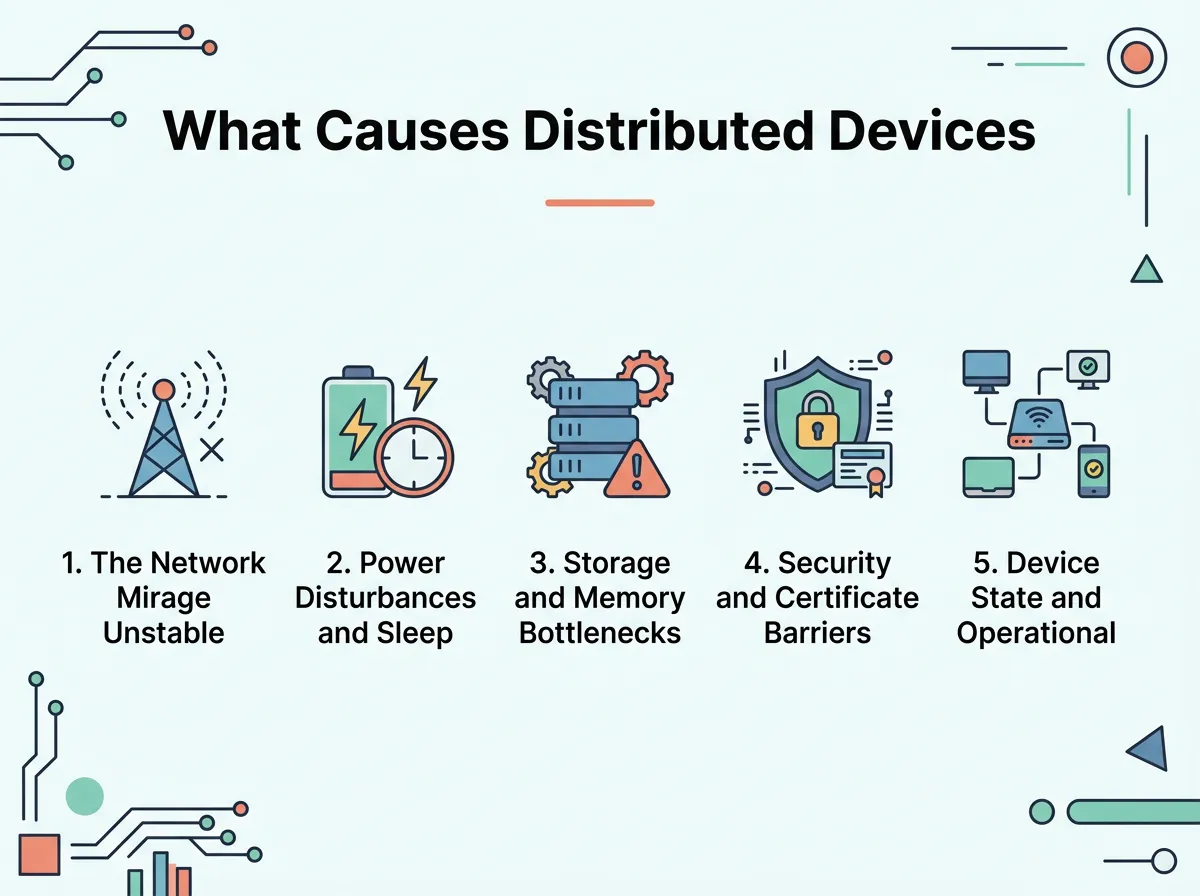
What Causes Distributed Devices to Miss OTA Updates? — key points at a glance
Aggressive Sleep Schedules
Many distributed devices run on batteries or solar panels. To save energy, they sleep most of the day. They might wake up for only ten seconds every hour to send data. If an update command is sent while the device is asleep, it misses the call. If the wake window is too short, the device will not have enough time to download the update before it falls back asleep.
Power Drops During Flashing
Writing data to flash memory requires a stable flow of power. If a battery is low, the extra power needed to write to the disk can cause a sudden voltage drop. When this happens, the device shuts down instantly. This can corrupt the memory, leaving the device “bricked” and unable to boot up again.
Storage and Memory Bottlenecks
Distributed devices are often built to be cheap and small. This means they operate with very tight memory limits.
Out of Storage Space
To run an update, a device usually needs enough space to hold two versions of its software. It needs space for the version it is currently running, and space to download the new version. If your device only has eight megabytes of storage, and your software takes up five megabytes, you cannot store both at the same time. The update will fail due to lack of space.
RAM Exhaustion During Decryption
Security is vital. Because of this, update files are usually encrypted and compressed. When the device receives the file, it must use its RAM to decrypt and unpack the software. This process is memory-intensive. If the device runs out of RAM during decryption, the system will crash and reboot, canceling the update.
Security and Certificate Barriers
Security protocols are designed to keep bad actors out. Sadly, these same protocols can sometimes lock your own updates out if things are not configured correctly.
The Trust Chain Dilemma
To accept an update, a device must verify that the file comes from a trusted source. It does this using security certificates. If a device has been offline for a long time, its security certificates might expire. Once they expire, the device will reject any new update files because it can no longer verify the signature. It becomes permanently locked out of the update loop.
Time Synchronization Failures
Secure connections rely on accurate time. Many edge devices do not have a real-time clock battery. Instead, they get the time from the network using NTP. If the network blocks NTP traffic, or if the device boots up with a default date of January 1, 1970, it will think modern certificates are not yet valid. This time confusion blocks the secure TLS handshake needed to download the update.
Device State and Operational Conflicts
Sometimes, a device receives the update perfectly but refuses to install it. This is usually due to the operational state of the machine.
Safety and Busy Lockouts
Consider a smart medical device or an industrial robotic arm. You do not want these machines to reboot and install an update while they are performing a critical task. Good firmware is designed to delay updates if the system is busy. However, if the device is constantly busy, or if the logic to find an “idle” window is broken, the update will be postponed forever.
Outdated Baseline Software
Software updates are often built in steps. Version three might require version two to be installed first. If a device misses version two, it cannot jump straight from version one to version three. This is known as dependency hell. The device gets stuck on its old version because it lacks the stepping-stone firmware required for the latest update.
Best Practices to Ensure Update Success
Now that we know what causes distributed devices to miss OTA updates, how do we fix it? Here are three proven strategies to make your update process highly reliable.
1. Use A/B Partitioning (Dual-Bank Flash)
Never overwrite your running software directly. Instead, divide your storage into two parts: Bank A and Bank B. If your device is running on Bank A, download the new update to Bank B. Once the download is complete and verified, tell the device to boot from Bank B. If the new software fails to boot, the device can instantly switch back to Bank A. This prevents your devices from bricking.
2. Keep Packages Small with Delta Updates
Instead of sending the entire software package, send only the files that have changed. This is called a delta update. Delta updates are much smaller. They download quickly, save cellular data costs, and succeed on weak networks.
3. Implement Smart Retries and Backoffs
If an update fails, do not try again immediately. This can drain the battery and overload your servers. Instead, use an exponential backoff strategy. Wait five minutes before the first retry, then fifteen minutes, then an hour. This gives temporary network issues time to clear up.
Conclusion
Understanding what causes distributed devices to miss OTA updates is crucial for anyone managing an IoT fleet. Network drops, power failures, storage limits, security checks, and state conflicts all work against your updates. By building your system with dual-bank memory, delta updates, and smart retry logic, you can protect your fleet. Reliable updates keep your devices secure, functional, and active in the field for years to come.
Frequently Asked Questions
Why do my devices fail to download OTA updates on cellular networks?
Cellular networks often suffer from weak signals and high packet loss. Large update files can easily time out during transfer, causing the download to fail if the system cannot resume partial downloads.
What does it mean when a device is bricked during an update?
A device is bricked when its firmware becomes corrupted, usually due to a power loss during the flashing process. Because the software is damaged, the device cannot boot up or receive future updates.
How does A/B partitioning prevent update failures?
A/B partitioning keeps two copies of the firmware on the device. If the new update on Bank B fails to boot, the device safely rolls back to the working software on Bank A, avoiding any downtime.
Why would an expired certificate prevent an OTA update?
Devices use security certificates to verify that an update is authentic and safe. If the certificates on the device expire, it can no longer trust the update server, causing it to reject the download.
Can low RAM prevent a device from updating?
Yes, because decrypting and unpacking secure update files requires significant memory. If a device runs out of RAM during this process, the system will crash and abort the update.
What are delta updates and how do they help?
Delta updates contain only the code changes between the old and new software versions. Because they are much smaller than full images, they download quickly and are highly successful on slow networks.
