

Choosing the right platform depends on your needs, but AWS IoT Device Management and Azure IoT Hub lead the market for large enterprises. Meanwhile, Blynk and ThingsBoard are the top choices for hobbyists, smart homes, and smaller business projects due to their user-friendly dashboards and flexibility.
Imagine having fifty smart lights, ten security cameras, and five smart thermostats in your building. Now, imagine they all stop working at the same time. You have to walk around and reset each one by hand. It sounds like a complete nightmare, does it not? This is the exact problem that many smart home owners and businesses face today.
As we add more smart gadgets to our lives, keeping track of them gets harder. You cannot manage dozens of devices one by one. You need a single screen to watch, control, and update them all. This common headache leads to an important question: What Is the Best IoT Device Management App?
In this guide, we will break down the top tools available today. We will look at what makes these apps great, compare the industry leaders, and help you choose the perfect fit for your setup.
Key Takeaways
- Define Your Scale: Big businesses benefit most from AWS or Azure, while smaller projects thrive on Blynk or ThingsBoard.
- Prioritize Security: Always choose an app that offers robust encryption and secure device authentication.
- Look for OTA Updates: Over-the-air updates save time by letting you update all device software remotely.
- Check Compatibility: Ensure the app supports the specific hardware and communication protocols you use.
- Test with Free Trials: Most top-tier platforms offer free tiers to help you test the software before you buy.
📑 Table of Contents
Why You Need an IoT Device Management App
You might wonder why you cannot just use standard apps to control your hardware. If you only have two or three smart plugs, you do not need anything fancy. But as your network grows, a dedicated IoT device management app becomes a necessity.
Remote Monitoring and Control
Imagine you run a business with temperature sensors in three different cities. You cannot physically go check them every day. A good management app lets you see if they are online, check their battery levels, and reboot them from your couch. It saves you hours of travel and physical work.
Easy Scaling
If your business grows, you will need to add more hardware. A proper app helps you onboard new devices in seconds. You can group them by location, department, or function. This keeps your entire network neat and easy to navigate.
Key Features to Look For in a Management App
Every app on the market claims to be the best. However, you should look for specific features to make sure you get a tool that actually works for you.
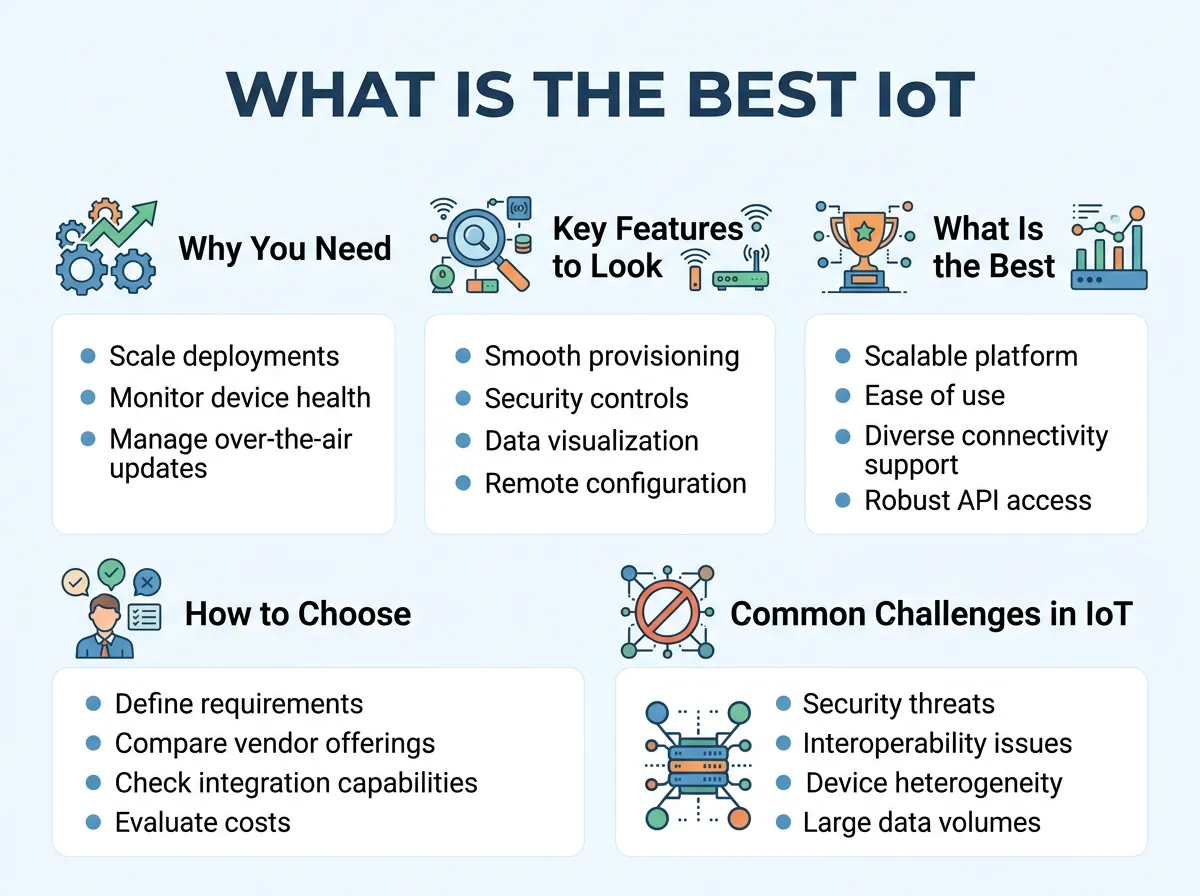
What Is the Best IoT Device Management App? — key points at a glance
Over-the-Air (OTA) Updates
Software needs updates to stay safe and run smoothly. An OTA update feature allows you to send new software to all your devices over the internet. You do not have to plug a cable into each unit. This feature is a massive timesaver.
Robust Security
Smart devices are major targets for hackers. The best apps use strong encryption to protect your data. They also check the identity of each device before letting it connect to your private network.
Real-Time Alerts
If a critical device fails, you need to know about it instantly. Look for apps that send immediate push notifications, emails, or text messages when a device goes offline or acts strangely.
What Is the Best IoT Device Management App? The Top Contenders
Now let us look at the top apps on the market today. We will compare their strengths to help you make an informed decision.
AWS IoT Device Management
Amazon Web Services (AWS) is a giant in the cloud world. Their device management tool is built for massive scale. If you are a business with thousands of devices across the globe, this is a top-tier choice.
AWS makes it easy to organize your hardware into logical groups. You can track device health and send secure updates quickly. However, AWS is highly technical. It has a steep learning curve and might feel too complex for beginners or hobbyists.
Microsoft Azure IoT Hub
Azure IoT Hub is another heavy hitter. It offers amazing security features and integrates perfectly with other Microsoft products. If your company already uses Microsoft services, this tool will feel very natural.
It handles giant flows of data with ease. Like AWS, it can be expensive and requires a good amount of technical knowledge to set up and run.
ThingsBoard
If you love open-source software, ThingsBoard is a brilliant option. It is famous for its beautiful, customizable dashboards. You can easily build charts, maps, and graphs to visualize your data.
ThingsBoard is highly flexible. It works great for small personal projects, but it can also scale up to handle large industrial operations. They offer a free community version, which is perfect if you want to keep costs low.
Blynk
Blynk is one of the most user-friendly platforms available today. It is a favorite among DIY builders, inventors, and small business owners.
With Blynk, you can build your own mobile phone app to control your hardware. You do not even need to write complex code. You just drag and drop buttons, sliders, and displays. It is a fantastic choice if you want to get a project up and running in a single afternoon.
Particle
Particle offers an all-in-one solution. They do not just make the management software; they also make the physical Wi-Fi and cellular chips.
Because they control both the hardware and software, everything works together seamlessly. You rarely have to worry about compatibility issues. It is incredibly reliable, but it does lock you into the Particle ecosystem.
How to Choose the Best App for Your Project
With so many great tools, picking just one can feel overwhelming. To make it simple, ask yourself these three basic questions:
What Is Your Budget?
Some tools charge you a flat monthly fee, while others charge you per device or by the amount of data you use. If you are on a tight budget, look at open-source tools like ThingsBoard or the free tiers of Blynk.
What Is Your Technical Skill Level?
If you love writing code and configuring cloud servers, you will enjoy the power of AWS or Azure. If you prefer a simple visual interface with less coding, Blynk is much more suitable.
How Fast Will You Grow?
It is easy to manage ten devices today. But what if you want to have five hundred next year? Make sure the app you choose can grow alongside your project without becoming too expensive or difficult to manage.
Common Challenges in IoT Device Management
Even with the best app, you will run into some hurdles. Knowing these challenges ahead of time will help you prepare.
Connectivity Issues
Devices will go offline. It is a fact of life. Your app needs to handle these drops gracefully. It should store data locally on the device and upload it once the connection comes back.
Data Overload
Smart devices generate a lot of data. If you track every single sensor reading every second, your system will slow down. Learn to filter your data. Only send the information that you actually need to see.
Practical Tips for a Successful Setup
To get the most out of your new software, follow these simple best practices from day one.
- Use Clear Names: Do not use default device names like “Device123.” Instead, use descriptive names like “Kitchen Temp Sensor” or “Warehouse Gate Camera.” This makes finding them in a crisis much faster.
- Test Before You Update: Never send a software update to all your devices at once. Test the update on a single device first. If it works fine, then roll it out to the rest of your network.
- Change Default Passwords: This is the golden rule of smart safety. Change all admin passwords immediately when you set up new hardware.
Conclusion
So, what is the best IoT device management app? The truth is, the “best” app depends on your unique goals.
For large enterprise networks that need ultimate security and scaling power, AWS and Azure are the industry standards. If you want a beautiful, custom dashboard with open-source flexibility, ThingsBoard is an outstanding option. And if you want a fast, fun, and easy way to build a mobile app for your smart devices, Blynk is the clear winner.
Most of these top platforms offer free trials or basic free accounts. Take your time, test a few of them out, and find the one that fits your workflow perfectly!
Frequently Asked Questions
What is an IoT device management app?
It is a software tool that lets you monitor, update, and secure your smart devices from a single digital dashboard. It helps you control devices remotely and keep them running smoothly without physical maintenance.
Is there a free IoT device management app?
Yes, several platforms offer free options. ThingsBoard has a free open-source community edition, and Blynk offers a free basic plan that is perfect for small personal projects.
Can I manage my smart home with these apps?
Absolutely, though some are easier than others. While enterprise tools like AWS are too complex for homes, user-friendly apps like Blynk are fantastic for managing custom smart home setups.
What does OTA update mean in IoT?
OTA stands for Over-the-Air. It means you can send software updates and bug fixes to your devices wirelessly over the internet, saving you from having to plug a cable into each physical device.
How do these apps keep my devices secure?
They use advanced security protocols, including data encryption and unique digital certificates. This ensures that only authorized users and trusted devices can communicate with your network.
Do I need coding skills to use an IoT app?
It depends on the app you choose. Enterprise platforms like AWS and Azure require strong programming skills, while drag-and-drop tools like Blynk allow you to build custom dashboards with very little code.
