

Choosing the right platform is critical for scaling smart networks. ThingsBoard stands out as the best overall open-source IoT device management software due to its rich visualization, robust security, and active community. For those seeking alternative approaches, platforms like Kaa IoT and Eclipse Ditto offer excellent niche capabilities for specific hardware needs.
Imagine waking up to find half of your smart sensors have gone offline. You have to check each one manually, driving from site to site just to reboot them. It sounds like a total nightmare, doesn’t it? As smart networks grow from a few test units to thousands of active nodes, keeping track of every sensor, gateway, and smart device becomes a massive headache. You need a centralized system to handle provisioning, updates, and monitoring.
Naturally, you might wonder: What Is the Best Open-Source IoT Device Management Software? Choosing the right tool can mean the difference between a smooth-running network and a chaotic mess. Fortunately, the open-source community has stepped up with incredible tools that rival expensive commercial options.
In this guide, we will break down the top free and open-source platforms. We will look at their key features, strengths, and weaknesses to help you pick the perfect match for your smart projects. We will also share practical tips on what features to look for before making your final choice.
Key Takeaways
- ThingsBoard is the top overall choice: It offers the most complete set of features, great dashboards, and massive community support.
- Kaa IoT is highly flexible: It is best for multi-protocol environments that need customizable cloud integration.
- Eclipse Ditto excels at digital twins: It is perfect if you want to create virtual representations of physical assets.
- Self-hosting saves money but takes effort: Open-source platforms eliminate licensing fees but require technical skills to set up.
- Security is a must-have: Ensure your chosen tool supports secure Over-the-Air (OTA) updates and encrypted communication.
- Community size matters: Popular tools have more tutorials, fewer bugs, and faster issue resolution times.
📑 Table of Contents
What Does IoT Device Management Actually Do?
Before we look at the specific software, let us clarify what these platforms actually do. You cannot just connect devices to the internet and hope for the best. You need a way to control them. A solid device management platform handles four core tasks.
First is provisioning and registration. This is how you introduce a new device to your network securely. Second is configuration and control. This lets you tweak settings on the fly without physical access. Third is monitoring and diagnostics. This tells you if a device is online, offline, or running low on battery. Finally, you need software updates. This involves sending firmware updates over the air to patch security holes or add new features.
To get a broader sense of how these tools rank in the wider industry, you can check out the curated list of IoT device management platforms on G2. This will show you how open-source alternatives stack up against proprietary giants.
The Top Contenders for Best Open-Source IoT Software
Several platforms claim the crown. However, a few have proven themselves in real-world deployments. Let us look closely at the top four open-source options available today.
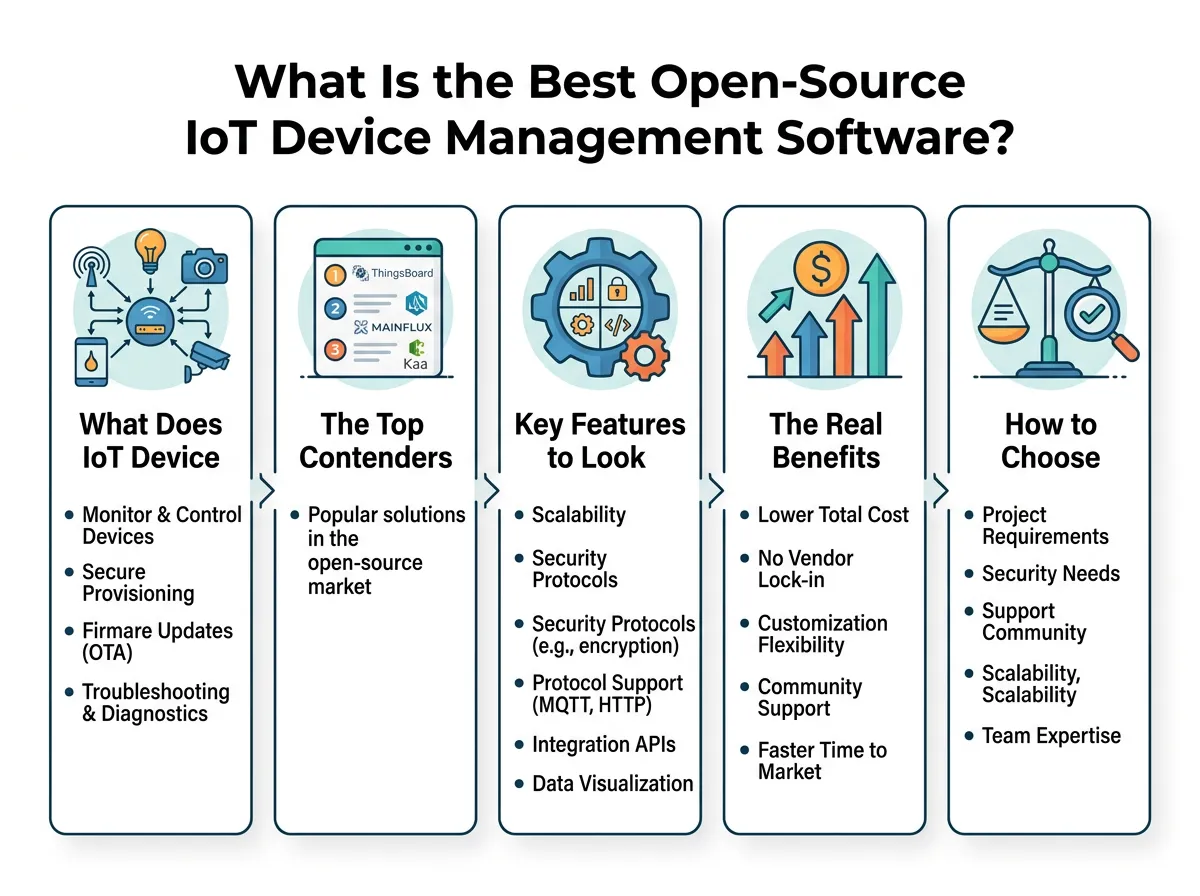
What Is the Best Open-Source IoT Device Management Software? — key points at a glance
ThingsBoard: The Visual Powerhouse
When developers ask, “What Is the Best Open-Source IoT Device Management Software?”, ThingsBoard is usually the first name mentioned. It is widely considered the king of open-source IoT platforms. It excels at data visualization and device management. The platform lets you create stunning, interactive dashboards with drag-and-drop widgets. You do not need to be a front-end developer to build a professional user interface.
ThingsBoard supports key IoT protocols like MQTT, CoAP, and HTTP. It also features a powerful Rule Engine. This engine allows you to build complex workflows. For example, you can set a rule that sends an email alert if a temperature sensor goes above 80 degrees. It is highly scalable and can run on a simple Raspberry Pi or a massive cloud cluster.
Kaa IoT: The Flexible Enterprise Framework
Kaa is one of the oldest and most mature open-source IoT platforms. If you need deep customization, Kaa is an excellent choice. It uses a modern microservices architecture. This means you can swap out parts of the platform you do not need, making it incredibly lightweight and tailored to your specific project.
Kaa excels at managing multi-protocol device fleets. It handles credentials, tracks device states, and delivers configuration updates smoothly. While the learning curve is slightly steeper than ThingsBoard, Kaa offers unmatched flexibility for enterprise-grade applications.
Eclipse Ditto: The Digital Twin Specialist
Eclipse Ditto takes a unique approach to device management. It focuses entirely on the concept of “digital twins.” A digital twin is a virtual mirror of a physical device in the digital world. The software keeps the physical device and its virtual twin in perfect sync.
If your physical device goes offline, your applications can still interact with its digital twin. When the physical device comes back online, Eclipse Ditto syncs all the changes. This is highly useful for complex industrial setups where network connections can be unstable. Keep in mind that Ditto is not a full-suite platform; it does not have built-in visualization dashboards. You will need to pair it with other tools.
Mainflux: The Modern, Lightweight Challenger
Mainflux is a highly secure, open-source IoT cloud platform written in Go. Because it is built with Go, it is incredibly fast and highly efficient with system resources. It is designed to act as a bridge between physical devices, data storage, and analytical applications.
Mainflux supports multi-tenancy out of the box, making it perfect for service providers who manage networks for different clients. It is simple to deploy using Docker, and it plays very well with edge computing setups. Refer to other reviews on reliable open-source platforms for IoT to see how Mainflux compares to traditional options in terms of system performance and security protocols.
Key Features to Look For Before Choosing
Not all open-source software is created equal. When deciding on the right tool for your fleet, keep these critical factors in mind:
- Security: Look for platforms that support transport encryption (TLS), secure device authentication (like X.509 certificates), and role-based access control.
- Over-the-Air (OTA) Updates: Your software must be able to push firmware updates to devices safely. A failed update can ruin your hardware.
- Protocol Support: Ensure the platform supports the specific protocols your hardware uses, whether that is MQTT, CoAP, LwM2M, or HTTP.
- Scalability: A tool that works well for ten devices might crash when you connect ten thousand. Check how the platform handles high-volume data.
You can read more about how top IoT tools and platforms manage these features to get a sense of modern industry standards.
The Real Benefits of Going Open-Source
Why choose open-source over a paid, proprietary service like AWS IoT or Microsoft Azure IoT? The most obvious reason is cost. Open-source software has no licensing fees. You can run it on your own hardware or cheap cloud servers.
But the biggest benefit is avoiding vendor lock-in. When you use a proprietary platform, you are stuck with their pricing and features. If they raise prices, you have to pay. With open-source, you own the entire stack. You can customize the source code to do exactly what you want. If you need a custom feature, you can build it yourself or hire a developer to build it for you.
How to Choose the Best Fit for Your Project
To find your perfect match, start by looking at your team’s technical skills. If you want a system that is easy to set up and has great visual dashboards, go with ThingsBoard. It is the friendliest option for beginners and intermediate developers alike.
If you are building a complex, industrial-grade system and need virtual models of your machinery, Eclipse Ditto is the clear winner. If you need a highly customized, modular microservices setup, choose Kaa IoT. Finally, if you want something fast, modern, and lightweight to run on edge servers, Mainflux is your best bet.
Conclusion
So, What Is the Best Open-Source IoT Device Management Software? While there is no single tool that fits every project, ThingsBoard remains the strongest all-around choice for most users due to its ease of use, robust features, and massive community support. However, platforms like Kaa, Eclipse Ditto, and Mainflux offer specialized advantages that might suit your specific hardware needs better.
The best way to decide is to download one, run it in a virtual environment, and connect a few test devices. Since they are open-source, it will not cost you a dime to find your perfect match!
Frequently Asked Questions
What is open-source IoT device management software?
It is free, community-supported software that lets you connect, monitor, and update smart devices from a single central panel. Because it is open-source, you can host it yourself and customize the source code.
Is ThingsBoard completely free to use?
Yes, ThingsBoard offers a fully functional Community Edition that is 100% free and open-source. They also offer a paid Professional Edition with extra features and dedicated support.
Can I run these platforms on a Raspberry Pi?
Yes, lightweight platforms like ThingsBoard and Mainflux can run easily on a Raspberry Pi. This makes them perfect for small projects, home automation, and local testing.
What is a digital twin in IoT?
A digital twin is a virtual model of a physical device that stays synced with the real object. It allows apps to check status and send commands even if the physical device goes offline temporarily.
How do I secure an open-source IoT platform?
You can secure your platform by using TLS encryption for all data transfers and requiring strong device authentication like X.509 certificates. It is also vital to keep your host server operating system and docker containers updated regularly.
Do I need coding skills to use these tools?
Yes, you will need some basic technical skills to set up and host these platforms on a server. However, tools like ThingsBoard offer user-friendly dashboards that do not require coding to use once the initial setup is complete.
